


Document management system (DMS): what it is, types and how to implement it in your company


What is a document management system (DMS)? It is software that centralises, organises and automates the management of a company’s documents so that information is always accessible, secure and under control. In this guide we explain how a DMS works, what benefits it brings and what to look out for when choosing the right one in 2026.
📹 If you prefer to watch a video, here we explain what a document management system is, the different types available, and how to implement one.
What is a document management system (DMS)?
A Document Management System is a set of tools and processes that allow the capture, storage, organisation and retrieval of the documents a company needs for its activity. These documents can be of different types, such as contracts, invoices, reports or case files, among others.
If you already know what it is and want to choose a specific tool, we have compared the main options in our document management software comparison for companies in Spain.
The nature of a DMS can vary depending on the needs and size of the company, although in general a DMS consists of a centralised database where all the organisation’s documents are stored, together with the information about their processes.
“There is a mistaken belief that a Document Management System only stores files”
There is a mistaken belief that a Document Management System only stores files (Word, Excel or PDF, for example). This confusion has its origin in traditional shared folder systems. One of the differences between a DMS and a shared folder system is that the DMS manages documents within the context of their process, and holds a great deal of information about it, on top of the files themselves.
Types of document management systems

Not every DMS does the same thing, even though they are all sold under the same name. It helps to tell them apart along three axes: how far they reach into the document, where they run, and which sector they are built for.
By functional scope
| Digital archive | Stores and searches files in a folder structure and little else. It is the natural step up from the shared drive, and it carries the same limits: nobody knows which version is the right one or where each matter stands. |
| Classic document manager | Adds document categories, metadata, version control, permissions and traceability. It knows what each document is, not just where it sits. |
| Process-oriented DMS | Besides classifying, it tracks the state of each document within its workflow and automates steps: creation from a template, sending, signing, data extraction with OCR or AI. It is the type that solves the department examples you will find further down. |
| ECM / CSP platform | Manages several different processes and combines their results, with integrations into ERP, CRM and other tools. It is the name Gartner gives to the top end of the market; we explain it under «Other names». |
By deployment model
In the cloud (SaaS), on your own servers (on-premise) or hybrid, with the data in the cloud and an application installed on the workstation. We cover the differences in cost, maintenance and control in the Cloud vs. On-Premise section.
By specialisation
General-purpose DMS can be configured for any process: contracts, procurement, case files, quality. Vertical ones are born for a sector with its own document standard: archives and public administration, engineering drawings, medical records, court files. A configurable general-purpose system usually covers most cases without programming; the vertical one pays off when sector regulation imposes a structure that cannot be negotiated.
Typical features of a DMS
The most common features you can expect to find in a document management system are:
Classification
| Folder organisation | The starting point we all know. |
| Document categories | Classifies documentation according to its type, on top of the folder it sits in. |
| Taxonomy and metadata | An information record that travels with the document. |
| Relational database and referential integrity | Lets you connect documents to each other and set rules for doing so. |
Workflow
| Workflow management | Controls the state each document is in within its process. |
Information security
| Security and permissions | Configure what each user can do with each type of document and in which folders. |
| Version control and change control | Review the changes a document has gone through over time. |
| Traceability | Review the history of actions on any document, so you can know who did what and when. |
| Secure file exchange | A way for customers and partners to download and upload their documents securely, better than by email. |
Teamwork
| Collaboration features | Create comments, reminders and tasks for your team |
Compliance and Legal
| Electronic signature | Send a document for someone else to sign from their own device. |
| Document retention | Lets you keep documents only for as long as necessary and schedule their automatic destruction once certain conditions are met. |
Automation
| Artificial Intelligence | Summarise content, extract data from documents, classify them automatically, check whether they meet given criteria. |
| Automatic Document Creation | Create a new document based on a template and its metadata. |
| Email inbox scanning | Lets the DMS automatically import the attachments of emails sent to certain addresses. |
| Automatic email sending | Creates and sends emails, SMS messages or notifications based on templates when the right moment arrives in the workflow. |
| Data extraction and classification through OCR | Lets the DMS extract metadata from the image of a document, whether scanned or digitally originated (PDF), and detect its category. |
Retrieval and querying
| Search | Find a document the way you would find a web page. |
| User-defined queries | Create reports showing the columns you need, after asking for the right parameters, and which you can also export to Excel. |
| Full text search | Also known as FTS (Full Text Search). The DMS opens documents, reads them and indexes their words. As a result, it lets you search inside their content. |
| Reporting and Dashboard | Displays a dashboard with statistics and graphical information about the different processes. |
Information capture
| Web forms | Let you request information from third parties by sending a link. That link gives access to a form which can be filled in from any device. |
Integration
| Ready-to-use plugins | Connections to other tools and applications (ERP, CRM, etc.) that come as standard with the DMS. |
| Connectors via API | Connections to other tools and applications that require software development. |
You can find a detailed description of each of these features here, including illustrations.

If you want to know which of these features matter most when choosing, we have gathered the most valued features of a document management system according to companies that already work with one.
Benefits of a Document Management System
A DMS can bring a number of benefits to a company. Some of the most important are:
Time savings and increased productivity
With a DMS in place, the company’s employees can access documents quickly and easily. As a result, the time spent searching for and retrieving information goes down, which in turn reduces cost and increases productivity.
On top of that, a DMS can automate more and more repetitive tasks, such as creating documents, sending emails or capturing and typing in data manually, which frees up time for more important work.
Improved information security
A DMS can include security measures to protect the company’s information, such as access control, change tracking, activity logging and encryption.
Compliance with standards and regulations
A DMS can also help the company comply with standards and regulations relating to how information is handled. The General Data Protection Regulation, for example, requires companies to take appropriate measures to protect the personal data they process.
Cloud vs. On-Premise: where should your DMS live?
One of the most critical decisions when choosing a document management system (DMS) is whether it will be hosted in the cloud (Cloud or SaaS) or on your own servers (On-Premise). There is no single answer; the best option will depend on your budget, your IT resources and your security policies.
Let’s look at the differences so you can choose the best option in each case:
Cloud model (SaaS – Software as a Service)
This is the most popular model today. By opting for a cloud solution, you buy the software as a service.
- Cost: instead of a large up-front investment, you pay a recurring subscription, usually monthly or annually.
- Infrastructure and maintenance: the software provider takes care of everything. That includes servers, storage, backups, updates and security patches. You do not have to worry about any technical aspect.
- Rollout and scalability: getting started is very quick, since the infrastructure already exists. It is also a very flexible and scalable model, letting you add or remove users and storage easily as your company grows.
- Control and accessibility: it offers strong security and the system is designed to be securely accessible from anywhere and from any device with an internet connection.
On-Premise model (on your servers)
In this model, you buy the software licence and install it on your own physical infrastructure.
- Cost. You have to make a very high up-front investment to buy the licences, the servers and the necessary hardware.
- Infrastructure and maintenance. You and your IT team are responsible for everything. That includes buying, installing and maintaining the servers, as well as manually managing every update and the security of the system.
- Rollout and scalability. The implementation process is considerably slower and more complex. Scaling the system is also more expensive and more difficult, since it requires buying more hardware.
- Control and accessibility. The main advantage is total control over your data, your infrastructure and your security policies. That makes it an option worth considering for companies in heavily regulated sectors. Remote access, however, is more limited and usually requires additional configuration, such as VPNs, to be secure.
Analyse these differences in the context of your own organisation so you can make the most strategic decision for your future document management system.
There is a third way that few vendors offer and that is worth asking about: a cloud DMS with a desktop application, which combines the zero maintenance of SaaS with the working speed of an installed application. R2 Docuo, for example, works this way, with data hosted in Spain and ENS HIGH level certification, the level Spanish public administration requires for its most sensitive systems, and a rating of 4.6/5 on G2 from 98 user reviews.
How to implement a Document Management System
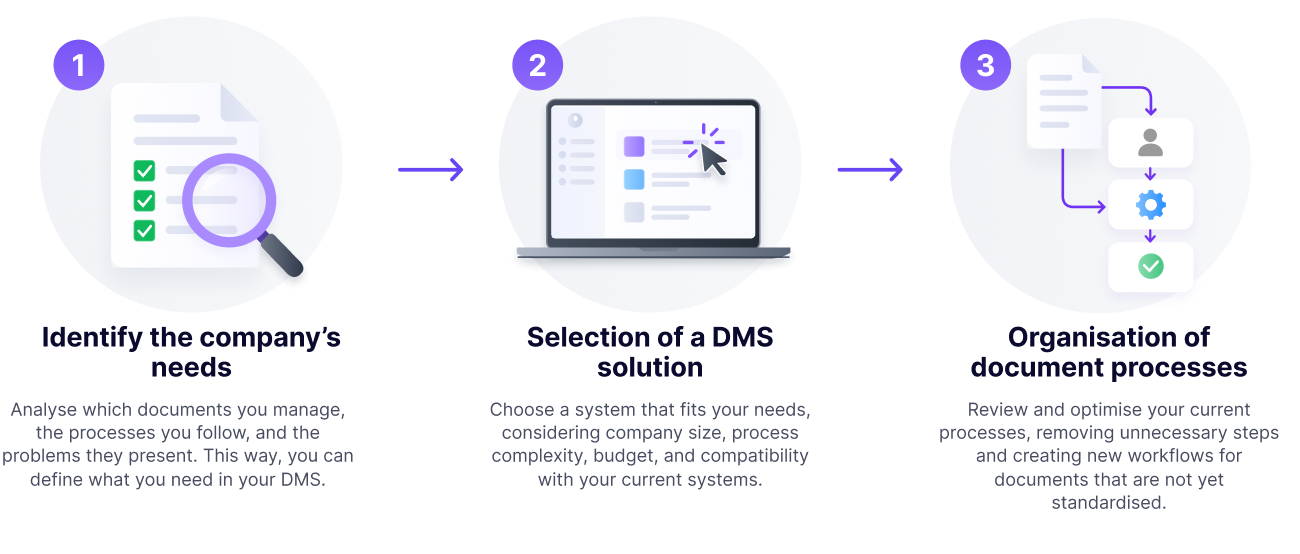
Implementing a DMS requires proper planning. Below are the steps generally recommended for rolling out a DMS in a company:
Step 1: Identify the company’s needs
Before implementing a DMS, it is important to identify the company’s needs in relation to handling documents. That includes identifying the types of documents handled, the processes followed and the problems those processes present.
Step 2: Choosing a DMS solution
Once the company’s needs have been identified, you have to select a DMS solution that fits them. It is important to consider factors such as the size of the company, the complexity of its processes, the budget and compatibility with the other systems used in the organisation. The specific criteria for assessing each option are set out further down, under how to choose a provider.
Step 3: Organising document processes
This can include reviewing how the company manages its documents internally. It can be a good moment to optimise and improve those processes, removing unnecessary stages also known as “waste”. It is also a perfect opportunity to create new processes for workflows that were not standardised until now.
For that review to be systematic, rather than depending on what each department remembers to mention, it is worth going through it category by category — contracts, invoices, case files, work reports — and filling in the same record for all of them:
- Name and code that this type of document will be given. It sounds trivial, but it is what stops the same thing being called three different names.
- The process it follows, drawn as a state diagram: which situations the document passes through from the moment it is created until it is closed.
- The agents involved at each step, distinguishing internal ones (company users) from external ones (customers, suppliers, public authorities).
- Metadata that has to be filled in or extracted from each document, thinking about what it will be used for afterwards: searching, generating templates or producing reports.
- Templates or models used today that could be generated automatically.
- Communications that can be automated between the agents in the process: which emails are written by hand today and always say the same thing.
- Techniques that apply to that particular category: electronic signature, version control, digitalisation, OCR.
- Permissions and security: who can view, edit and download documents of that type.
With that record filled in for every category you have, in effect, the specification of the system. And something just as useful: an implementation order with proper criteria, because at a glance you can see which document types move the most volume and which concentrate the most manual work. You can copy this record as it is into a spreadsheet: one row per document category and one column per field in the list.
“If, while filling in the record for a category, there are questions nobody can answer, that is not a problem with the tool: it is a pending business decision that the rollout was going to uncover anyway”
There is one shared field that deserves separate attention: the metadata that appears in several categories at once (customer, supplier, project, owner) should be named the same and mean the same across all of them. If each category is designed on its own, you end up with “Customer”, “Customer name” and “Registered name” as three different fields containing the same thing, and the day someone wants to cross-reference contracts with invoices there will be no way of doing it.
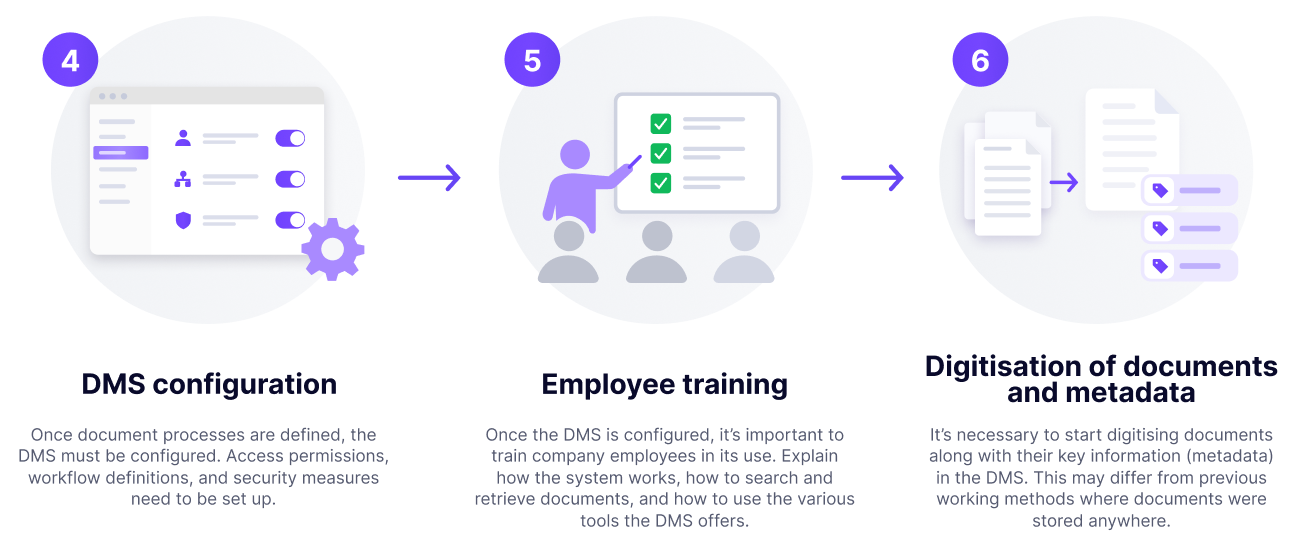
Step 4: Configuring the DMS
Once the document processes have been defined, the DMS has to be configured so that it implements them properly. Access permissions have to be set, workflows defined and security measures configured. In many cases the software manufacturer can help with this step through training, consultancy and parameterisation services.
Step 5: Training employees
Once the DMS has been configured, it is important to train the company’s employees in how to use it. That includes explaining how the system works, how to search for and retrieve documents, and how to use the different tools the DMS offers.
Step 6: Digitalising documents and metadata
This is really the kick-off of the project.
Although the overall time saving from using a DMS is obvious, whether all at once or day by day, you have to start digitalising documents together with their key information (metadata) in the DMS, something that was not being done before.
This can be a change from the previous way of working, in which documents were saved anywhere at all.
“Some people may take longer than before to do certain tasks, because now they have to enter additional data”
Paradoxical as it sounds, some people may take longer than before to do certain tasks, because now they have to enter additional data. The extra effort at this stage is more than repaid later, in every process, when that information has to be consumed or when other steps can be automated.
Digitalising documents can be done manually, but also using a scanner or by automatically monitoring an email inbox to pick up the attachments sent to it.
It is important to make sure the quality of the digitalisation is good and that the metadata is extracted or typed in correctly. That is what guarantees the time saving in later phases of each process.

Best practices for using a Document Management System
To make sure the DMS works properly and delivers the expected benefits, it is important to follow a few best practices. Here are some of them:
Define a document management policy
It is important to define a document management policy setting out how documents should be handled in the company: defining the types of document, how they should be stored and which processes they follow, how long they have to be kept, and other legal or compliance considerations.
Set access permissions
It is important to set appropriate access permissions to make sure only authorised employees can reach the company’s documents. That includes defining permissions per user or per group of users.
Configure workflows
Workflows help automate repetitive tasks, making sure documents follow the right processes in the company. That is why it is important to define workflows that fit the company’s processes and that have been agreed by everyone involved in them.
Take backups
It is important to take regular backups of the documents stored in the DMS, so that in the event of a system failure or a natural disaster the documents can be recovered quickly and easily. If you are using a cloud DMS, this will usually be included in the service.
Integration with the company’s other systems
Once the Document Management System is up and running, it is a good moment to connect it to other software applications such as invoicing and accounting software (ERP), sales management software (CRM), and so on.
This can be done increasingly easily using the ready-to-use plugins that come with most DMSs, or by developing custom connectors. In the latter case, costs need watching, or the work should be taken on as an in-house development, since it is generally expensive.
Typical problems when rolling out a DMS
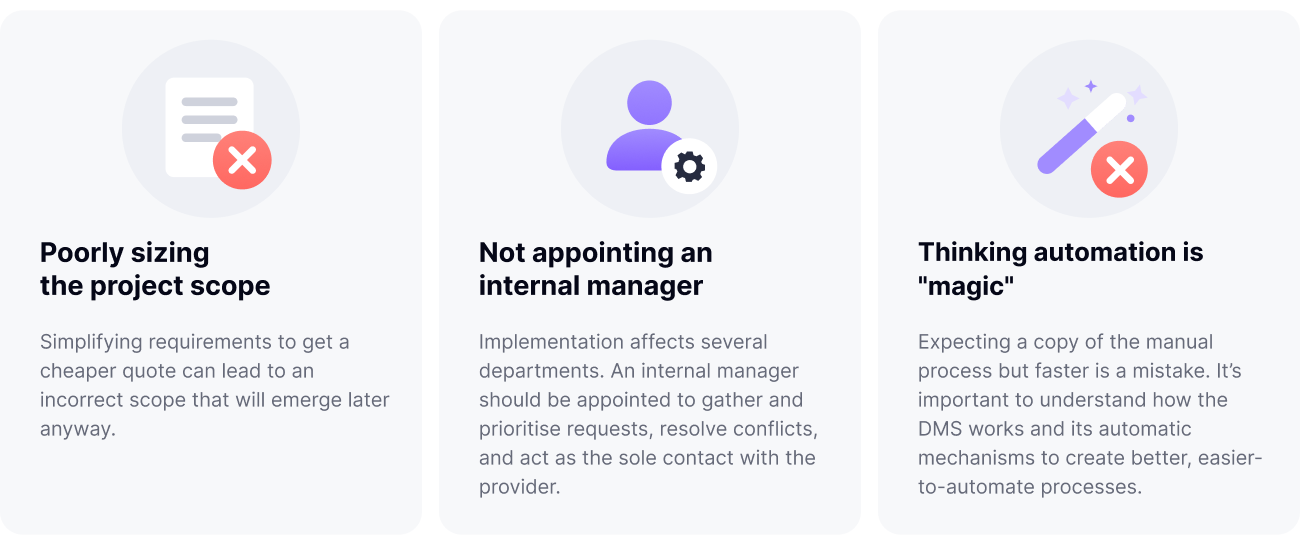
Rolling out a Document Management System is no different from rolling out any other software, and neither are the problems that can arise. Here are some classics:
Getting the scope of the project wrong
To put together a quote, any DMS technology provider will need a full understanding of the starting point, the pain points to be solved and how complex they are. With that information they will propose consultancy, parameterisation and training services based on an estimate of the project. Sometimes requirements get simplified in order to obtain or offer a cheaper quote, which produces a mistaken scope that will surface later anyway.
Not appointing an internal owner
Rolling out a DMS in an organisation typically affects several departments. Normally the DMS technology provider will have to meet different requirements from all of them over the course of the project. In general, it is a bad idea to leave the coordination of those requirements in the provider’s hands. An internal owner should be appointed within the organisation to gather every request, prioritise them internally, resolve conflicts when they arise, and act as the single point of contact with the provider.
Thinking automation is “magic”
Approaching automation projects thinking the result will be a copy of the manual process, only faster, is a mistake. It is important to understand how the DMS and its automatic mechanisms work in order to build improved versions of the manual processes that are easier to automate. It is one of the most common mistakes when a company automates processes for the first time.
Who uses a Document Management System
Document management applies to practically any sector, but not everyone needs it with the same urgency. The criterion is not the size of the company, but how much of its daily work consists of moving documents around.
Any medium-sized company benefits from a DMS: payroll, requests, supplier contracts and dealings with public authorities generate a volume of documents that, beyond a certain point, no longer fits in shared folders. But there are organisations for which documents do not accompany the business, they are the business:

- Public authorities and official bodies, where the case file is the unit of work and deadlines are set by regulation.
- Law firms, administrative agencies and consultancies, which work on third-party documentation with deadlines and professional liability.
- Engineering, construction and energy, with thousands of drawings, specifications and certificates whose revisions change constantly.
- Companies with ISO certifications or subject to audit, which have to demonstrate which version of each procedure was in force at any given moment.
- Archives, libraries and museums, for which description and preservation are the main activity.
In these cases the DMS is not a productivity improvement: it is the central tool everything else rests on.
Document management examples by department
These are the processes that most often get digitalised first, with the documents they handle, the flow they follow and the metadata that is usually defined. They serve as a starting point for filling in the record from step 3.
| Department | Documents | Typical process | Key metadata |
|---|---|---|---|
| Procurement | Purchase requests, quotes, purchase orders, delivery notes, supplier invoices, supplier approvals | Request → approval by amount → order → receipt → invoice sign-off. Detailed in procurement processes. | Supplier, cost centre, amount, delivery date, approval status |
| Finance and administration | Issued and received invoices, service contracts, supporting documents | Receipt → validation against the order → posting → archiving for the legal retention period | Number, tax ID, amount, due date, financial year |
| Operations and logistics | Work reports, transport control documents, certificates, incidents | Generation → signature on the move → closure → report | Customer, route or plate number, date, owner |
| Quality, safety and compliance | Procedures, ISO records, audit evidence, non-conformities | Drafting → review → approval → publication → periodic review, with the current version always identified | Version, effective date, approver, applicable standard |
| Legal and contracting | Contracts, annexes, powers of attorney, non-disclosure agreements | Draft from a template → negotiation → electronic signature → renewal alerts | Counterparty, signature date, expiry, amount, automatic renewal |
| Human resources | Employment contracts, payslips, leave, training, health and safety | Onboarding → signature → delivery to the employee → archiving for the legal retention period | Employee, document type, date, retention period |
| Customer service and case handling | Requests, complaints, customer case files | Registration → assignment → resolution → communication → closure | Applicant, procedure type, deadline, status |
In every case the pattern is the same: a document, a process with states, and metadata that lets you search, automate and report. What changes from one department to another is the record for each category, which is exactly what you fill in at step 3 of the rollout.
How to tell whether the DMS is working
Once it is up and running, the question stops being “is it configured properly?” and becomes “is it improving anything?”. And that one can be measured, because the system itself keeps a trail of everything that happens.
- Bottlenecks. In which state do documents pile up? A state where everything grinds to a halt points to a badly designed step, a missing permission or an overloaded person.
- Average cycle time. How long a document takes to travel through the complete process, and how that number evolves month by month.
- Fields that are surplus or missing. A metadata field nobody ever fills in is a field to remove; information people keep writing into the body of an email is a field to create.
- Traceability. Who did what, when and to which document. It is the evidence an audit asks for, and also the way to settle an argument about what actually happened.
“An automated process nobody reviews degrades just like a manual one. The difference is that the automated one leaves the data to notice it”
The sensible thing is to set aside a review every six months with the people actually using the system. Most improvements only become obvious once the process has been running for a while.
Other names
The evolution of business productivity tools over time has produced many ways of referring to a Document Management System, as a consequence of its growing feature set:
| Document Manager | Or Document Management Software, perhaps the most widely used name, in use ever since software began categorising documents and storing them alongside their metadata back in the 1980s. |
| BPM Software | Business Process Management software. The term was created when DMSs incorporated Workflow features for separate processes, along with the ability for users to define those processes themselves. |
| ECM Software | Enterprise Content Management software. In a 2002 report, the American consultancy Gartner coined this term, when software became able to manage several different processes and combine the results of one with another. |
| CSP Software | Content Services Platform. In 2016, Gartner suggested another name change to reflect the increasingly common use of several connected tools rather than one main one, with the resulting proliferation of integrations, connectors and plugins. |
Whichever term is used, Document Management Systems have kept evolving over time in order to stay on the market, thanks to the incorporation of the features described here.
How to choose a document management system provider
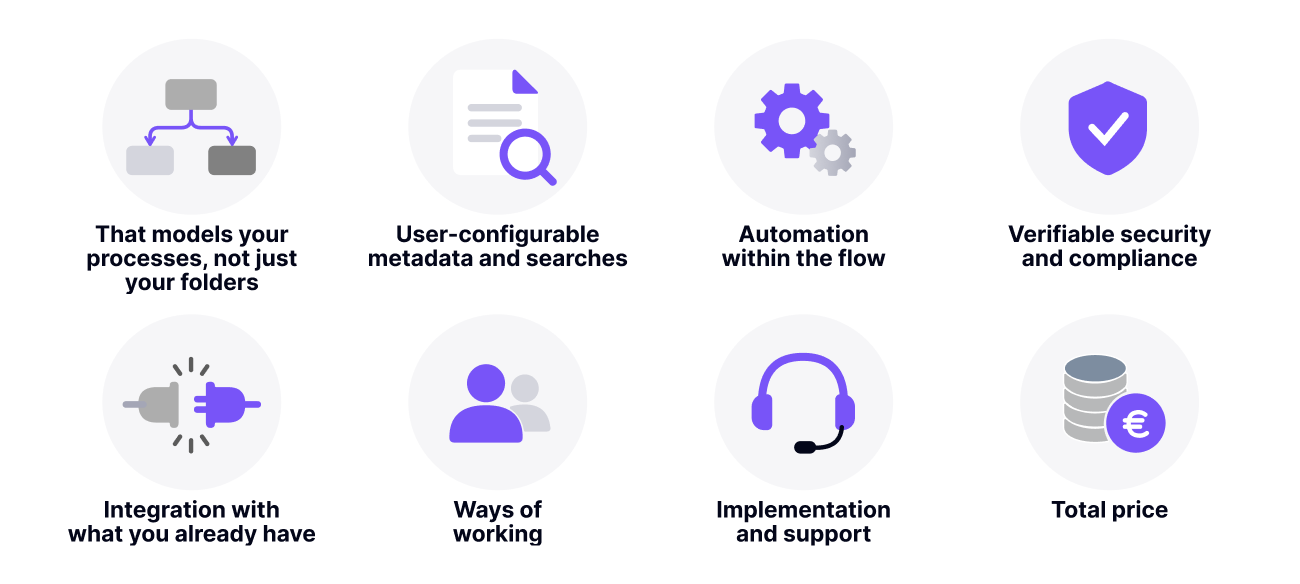
Before browsing catalogues it is worth settling the criteria. These are the ones that separate a rollout that works from one that gets abandoned in its second year:
- It should model your processes, not just your folders. Ask to see how a state flow is defined and who can change it without programming.
- Metadata and searches configurable by the user, not by the vendor at every change.
- Automation inside the flow. Templates, emails, signature, OCR and AI operating within the process, not as separate modules you have to bolt on.
- Verifiable security and compliance. Certifications with their scope and level (ISO 27001, ENS and at which level), where the data is hosted and who can access it.
- Integration with what you already have. Connectors to the ERP and CRM in use and a documented API for everything else.
- Ways of working. Browser, desktop application, mobile, and access for external third parties without a full licence.
- Rollout and support. Who configures it, in how many weeks, and what happens when you change a process next year.
- Total price. Licences, external users, storage and onboarding services. Be wary of anything that is not published.
With the criteria clear, comparing is quick. If you want to see how the tools most used in Spain measure up against this list, see our comparison of the 8 most used document management programs in Spain, with prices and ratings.
Conclusion
A Document Management System is an essential tool for handling a company’s documents efficiently. Implementing one can bring a series of benefits, such as time savings, cost reduction and improved information security.
To make sure the DMS works properly in a company it is important, first, to follow the necessary steps, to prepare the documents and processes properly, and finally to configure the system. It is also important to follow best practices to guarantee correct use of the DMS and to maximise its benefits.
Implementing a Document Management System can be a valuable investment for any company, since it improves efficiency in handling documents and protects information properly. What is more, by following best practices you can maximise the likelihood that the DMS will work properly and deliver the expected benefits.
Frequently Asked Questions
A Document Management System is a tool that allows the efficient and organised handling of a company’s documents. It also lets you digitalise, store and retrieve documents quickly and easily.
Implementing a Document Management System can bring a series of benefits, such as saving time searching for and retrieving documents, reducing the cost of storing paper and improving information security.
When implementing a DMS you need to follow these steps: assessing the company’s needs, selecting the right system, organising the document processes, configuring the system, training employees and digitalising the documents and their metadata.
Some of the best practices for using a Document Management System include, for example, defining a document management policy, setting appropriate access permissions, defining effective workflows and taking regular backups.
To choose the right document management system for your company, it is important to assess the company’s needs and check them against the list of Document Management features of the DMS you have chosen, so that you have all the necessary information available. You also have to consider the budget available and compatibility with the company’s other systems. That is why it is advisable to compare different options before making a final decision.
By scope: the digital archive (only stores and searches), the classic document manager (classifies with metadata, versions and permissions), the process-oriented DMS (adds workflows and automation) and ECM or CSP platforms (several integrated processes). By deployment they can be cloud, on-premise or hybrid with a desktop application.