


INFOGRAPHIC: 9 Differences between Document Management and Shared Folders

It is common to compare professional cloud Document Management Software with simple file storage services using shared folders, such as DropBox, Google Drive or OneDrive.
A document management system is not limited to storing files: it includes additional tools to speed up the creation, handling and everyday use of those files. If you are considering replacing Drive or OneDrive with one, in document management system vs shared folders we look at when each option makes sense.
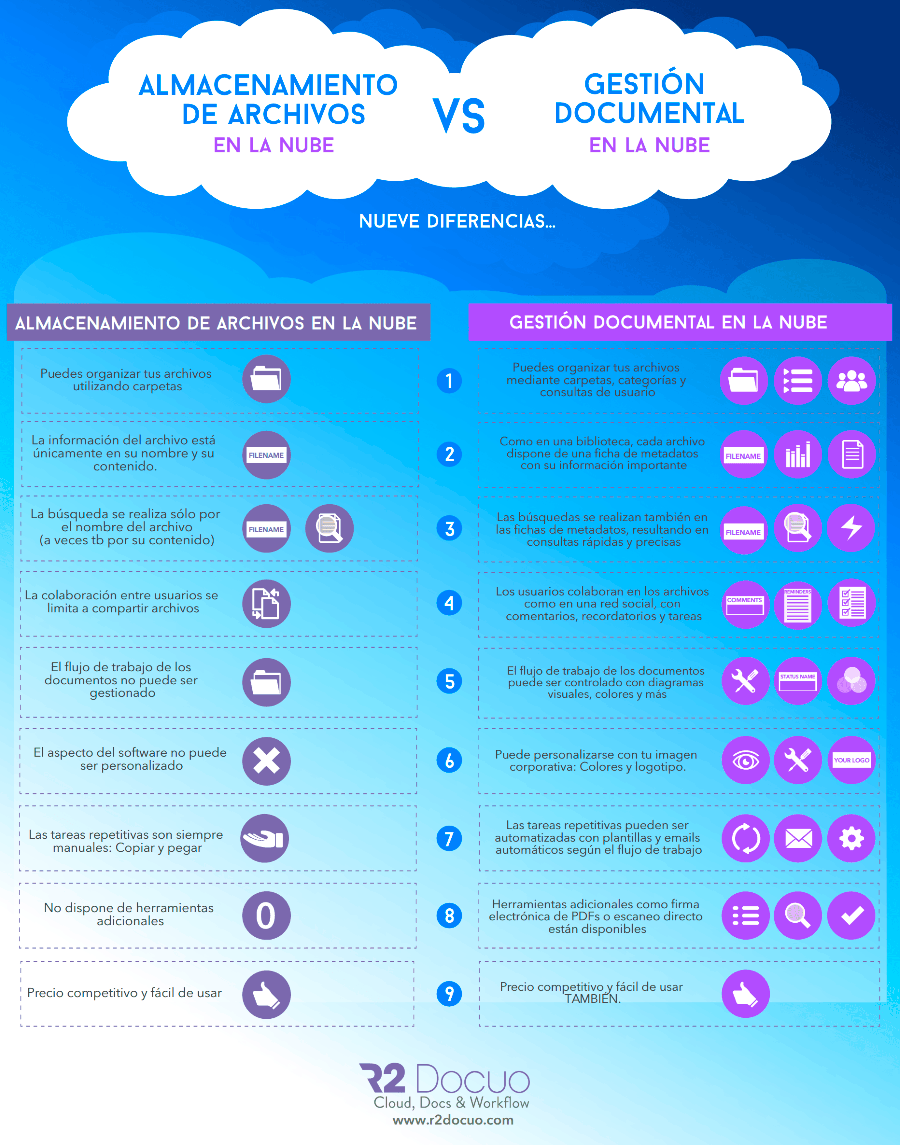
You are probably wondering what the main practical differences between the two are. We have put together an infographic with the nine main differences (click on the infographic to see it larger):
1. File organisation
In a document management system you can organise your files using folders, categories and user queries. With simple cloud file storage you can only do it with folders.
2. Metadata
In document management software, as in a library, every file has a metadata record to hold its most important information. In a traditional file storage service the only source of information is the file name and, at best, its content (FTS).
3. Searches and user queries
In a document management system, searches look both at the file name and at its main metadata, resulting in fast, precise queries and searches.
4. Collaboration tools
In a cloud document management tool, collaboration between users resembles that of any social network such as Facebook or Instagram, where users can leave comments, reminders or tasks about their shared work. In a cloud file storage service the only collaboration between users is based on sharing files.
5. Workflow management
Cloud document management systems such as Docuo have workflow management features for documents that let you know the status of each file within the company’s internal process (a quote being created, sent, accepted or rejected by the customer) and also show it to users through diagrams, colours or status names, whereas with file storage services only folders can be used for this.
6. Corporate branding
The look of the Docuo document management software can be customised so that when your customers or partners reach the file sharing or collaboration screens, they see the whole environment with your logo and corporate identity and know where they are. Free file sharing services generally have no customisation options.
7. Handling repetitive tasks: templates and automatic emails
Repetitive tasks in document management software can be automated through scheduling and workflow design, whereas with cloud file storage services you always have to fall back on copying and pasting old versions of documents.
8. Additional tools
Cloud storage services have no additional tools for working on files beyond online editing (at best). Document management software offers everything from OCR to direct scanning and digitisation of files or the electronic signing of PDF documents.
9. Price and ease of use
Free cloud storage services are affordable and have a gentle learning curve that lets you use them in no time. The Docuo cloud document management system can be used for the same price as a cloud storage service and with the same simplicity, while also bringing additional features that are useful for companies and teams.