


Invoice management: what it is, its 7 stages, 2026 regulations and how to automate it


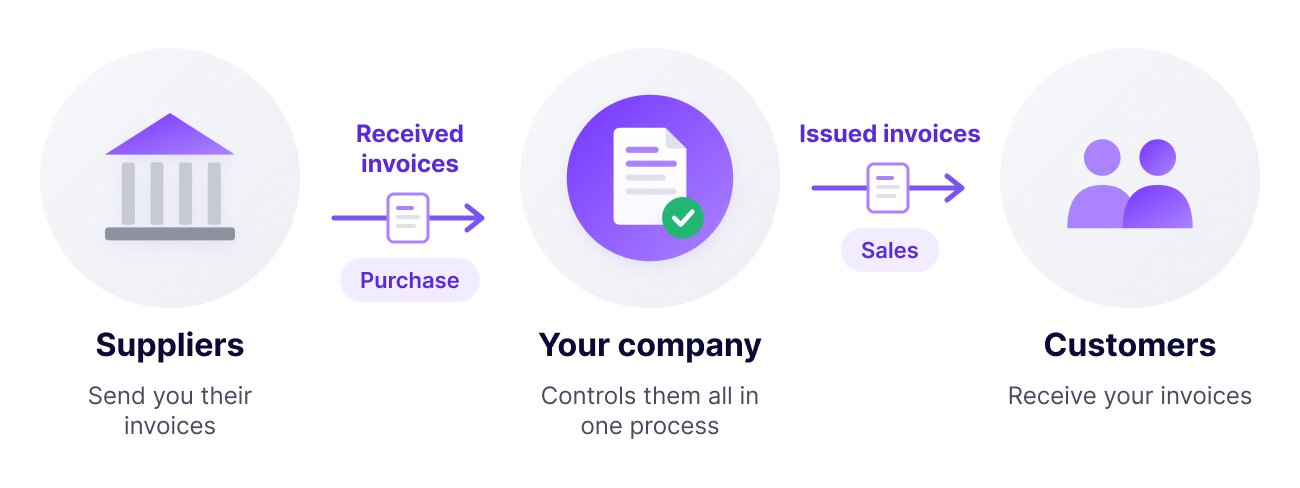
Invoice management is the set of tasks a company uses to control all its invoices, both purchase invoices, received from suppliers, and sales invoices, issued to customers, from the moment they arrive or are created until they are paid or collected and archived for the legally required period. It covers receiving them, extracting their data, checking them, approving them, posting them to the accounts, paying or collecting them, reporting their status to the Tax Agency when the law requires it, and keeping them. It works well when nobody pays the same invoice twice, none is left forgotten in an inbox and any invoice can be produced in seconds for an inspector or an auditor.
In this guide you will find what invoice management is and how it differs from invoicing, the 7 stages of the process for received invoices, how issued invoices are managed and what to do about unpaid ones, the basic numbering and register-book obligations, what Spanish regulations require from 2026 onwards (mandatory electronic invoicing between businesses, Verifactu, SII, payment and retention periods), the minimum that has to work, how to measure the process and how to automate it step by step.
What is invoice management?
An invoice is the document that evidences a commercial transaction: who is selling, who is buying, what, when, for how much and with what taxes. For the issuer it is a right to payment; for the recipient, an obligation to pay and the proof that allows them to deduct the VAT and the expense. Invoice management makes sure that document travels through the company without getting lost, without errors and leaving a trail of who did what.
Purchase and sales invoices: two different processes
- Received or purchase invoices (accounts payable): those sent by suppliers. This is the process with the most manual work, as they arrive in different formats, through different channels, and have to be checked before payment.
- Issued or sales invoices (accounts receivable): those the company sends to its customers. Here the challenge is to issue them correctly first time, with software that complies with the regulations, and to follow up on payment until the money comes in.
Invoice management, invoicing and accounting: what each term means
- Invoicing is the issuing of invoices: creating, numbering and sending them. It is one part of invoice management, the sales side.
- Invoice management is the whole process, for both received and issued invoices, with its cycle of checking, approval, payment or collection, and archiving.
- Accounting records the financial effect of each invoice in the books. Invoice management hands it correct, checked data; if it does not, accounting becomes the place where errors are discovered.
What an invoice management system is and what it is made of
Managing invoices is an activity; an invoice management system is the organised way of doing it: a defined process (where each invoice comes in, what is checked, who approves and when it is paid), named people in charge and a tool to support it, with a single point of entry, automatic data extraction, an approval workflow, a connection to the accounts and a legal archive.
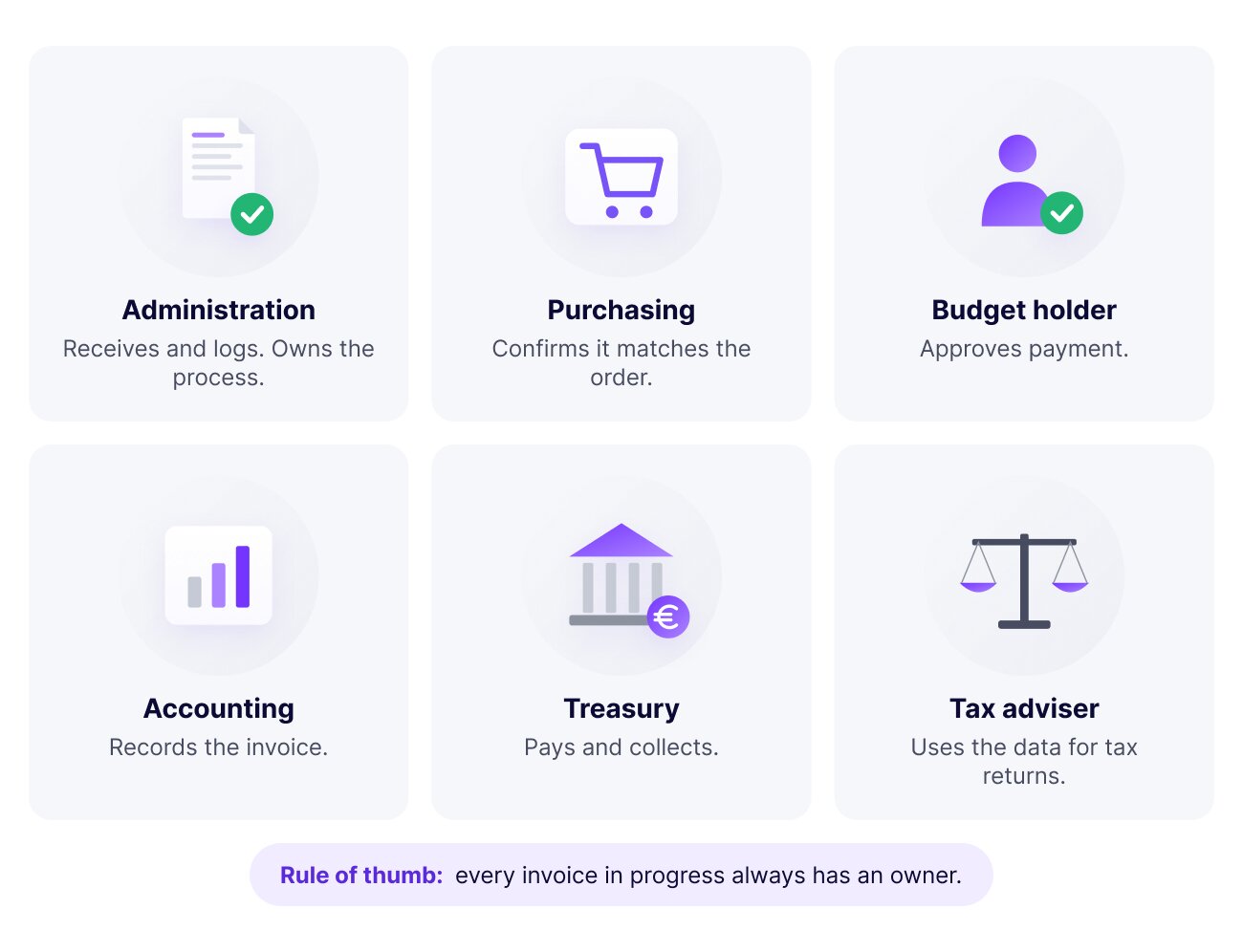
Several departments take part in the process: administration, which receives and records the invoices and is the natural owner of the process; purchasing, which confirms that what has been invoiced matches what was ordered; the budget holder for each expense, who approves it; accounting, which records it; treasury, which pays and collects; and the tax adviser, who needs the data for tax returns. The practical rule is that every invoice in progress has someone assigned to it at all times.
Why it matters: cost, cash flow and compliance
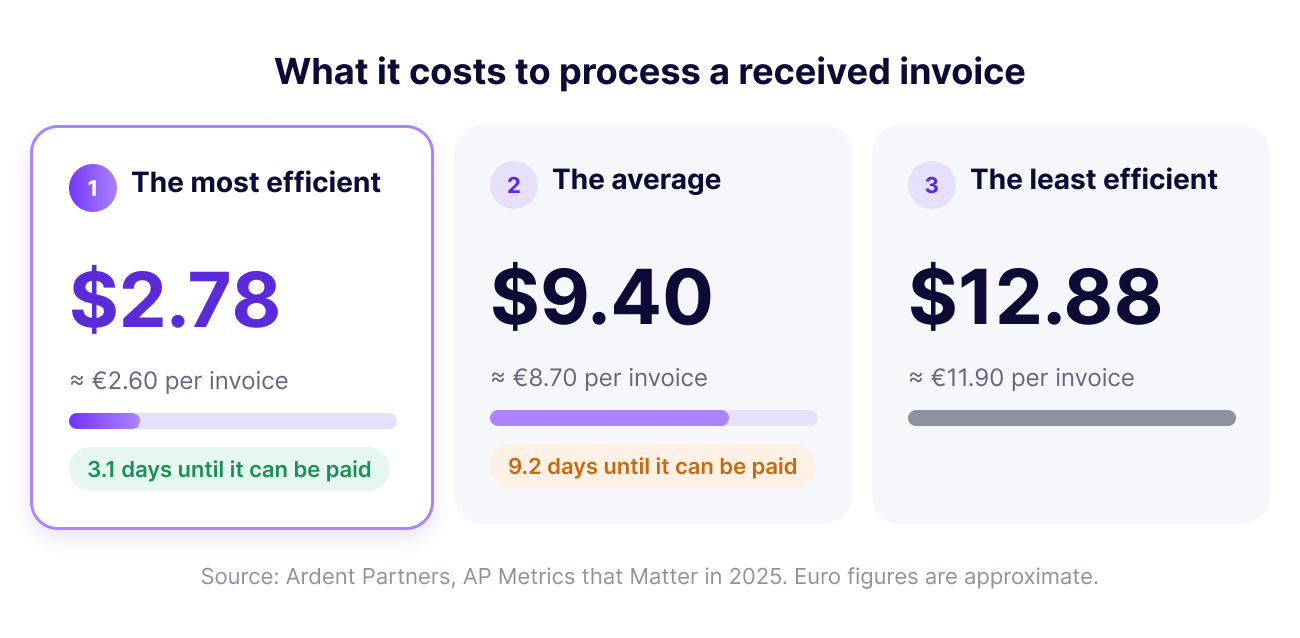
Processing an invoice costs money, and the difference between doing it well and doing it badly is large. According to Ardent Partners’ study AP Metrics that Matter in 2025 (with data from 212 accounts payable professionals), processing a received invoice costs an average of 9.40 dollars (about 8.70 euros) and takes 9.2 days. The most efficient organisations do it for 2.78 dollars (about 2.60 euros) in 3.1 days; the least efficient, for 12.88 dollars (about 11.90 euros). In other words, the same work costs almost five times more depending on how it is organised. APQC data, from 2018 and covering 1,485 organisations, point in the same direction: 2.07 dollars (about 1.75 euros) or less in the most efficient quartile compared with 10 dollars (about 8.50 euros) or more in the least efficient. The euro equivalents are approximate, at the European Central Bank’s average exchange rate in the year of each study.
Processing the same invoice can cost almost five times more depending on how the process is organised.
But the cost per invoice is only the visible part. Poor management is also paid for like this:
- Duplicate or incorrect payments. The same invoice arrives by email and on paper, or the supplier sends it again, and it gets paid twice. Or an invoice is paid that does not correspond to anything received.
- Fraud. Bank account changes notified by email, fictitious suppliers or inflated invoices. Ardent Partners ranks fraud among the top three challenges for accounts payable departments, cited by 29%.
- Late payments and supplier relationships. An invoice that waits weeks for approval breaches the legal payment deadline and leads to phone calls, complaints and late-payment interest.
- Delayed collections. On the sales side, an invoice with errors is an invoice the customer rejects or does not pay on time, and that is cash that does not come in.
- VAT not deducted or wrongly deducted. An invoice that does not meet the legal requirements does not allow the VAT to be deducted; nor does one that gets lost.
- Penalties and formal requests. Missed deadlines for reporting to the Tax Agency, invoices that cannot be found during an inspection or invoicing software that does not comply with the regulations.
- Team time. Every stalled invoice generates supplier queries along the lines of “when are you paying me?”, and answering them takes away the time the accounts payable team should be spending on control.
The purchase (received) invoice process: the 7 stages
Every supplier invoice goes through seven stages, from the moment it arrives until it is archived. For a recurring invoice with no issues they can take minutes; for one with discrepancies, weeks. For each stage we describe what happens, what usually goes wrong and what is needed to keep it under control.
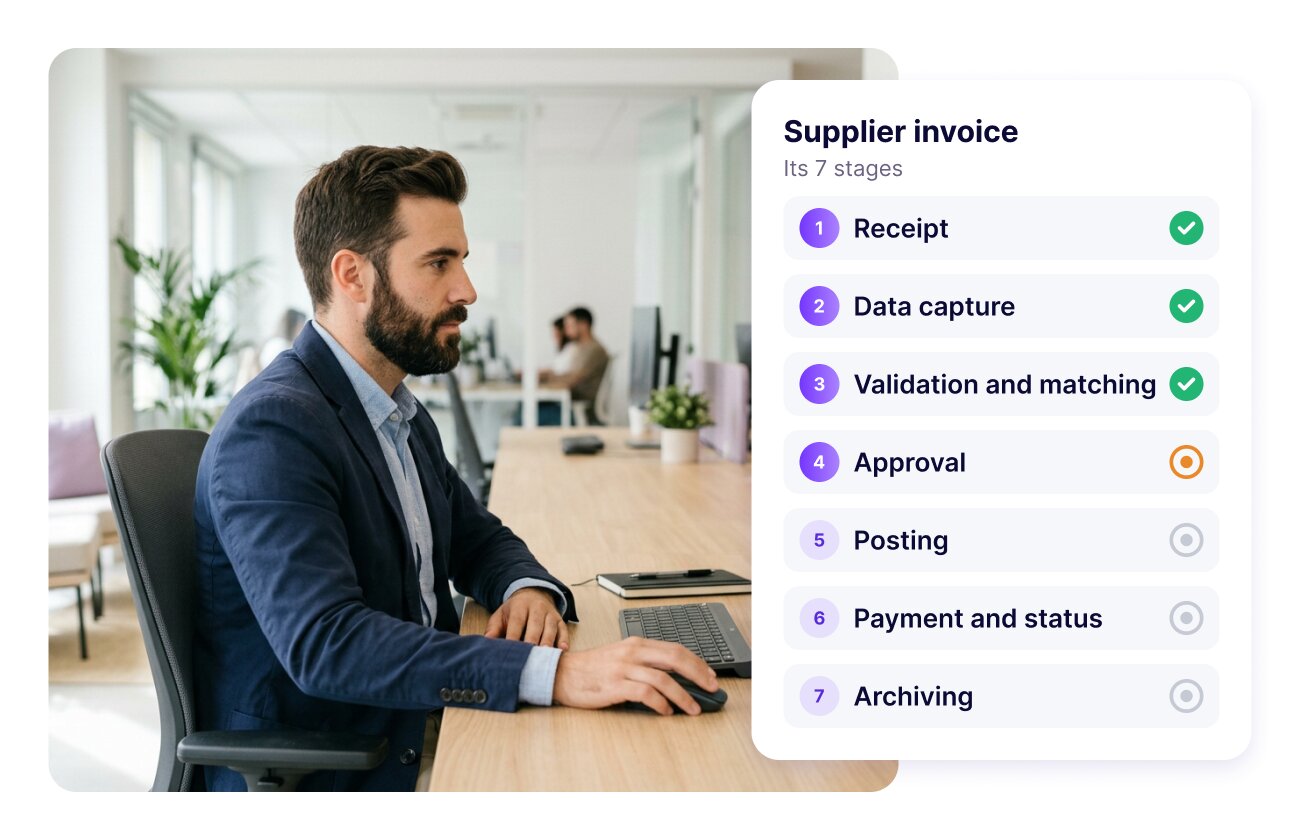
1. Receipt
The invoice reaches the company. Today it may arrive on paper, as a PDF attached to an email, through a supplier portal or as a structured electronic invoice (an XML file that software can read without human intervention). Once electronic invoicing between businesses becomes mandatory, it will also arrive through the Spanish Tax Agency’s (Agencia Tributaria) public solution or through a private exchange platform.
What goes wrong: each supplier sends to a different address, to the salesperson who bought from them or to whoever they feel like. Invoices sit in personal inboxes, get lost during holidays or arrive twice through several channels.
What you need: a single point of entry, communicated to all suppliers: a dedicated email address, a portal or an electronic channel that records each invoice with its date of receipt. That date matters: the legal payment and reporting deadlines run from it.
2. Data capture and extraction
The invoice data become company data: supplier, tax ID (NIF), number, date, taxable base, VAT rate and amount, withholdings, total, due date, purchase order number. If the invoice is a structured electronic one, the data already come in the file; if it is on paper or a PDF, they have to be extracted.
What goes wrong: someone keys in the data by hand, with all the time and errors that entails: an amount with a transposed digit, a wrongly copied tax ID, a due date that is not recorded. The errors do not show up here; they appear at payment or at the quarter-end close.
What you need: automatic extraction. Traditional OCR reads characters but depends on templates for each supplier; AI-based extraction understands the invoice from its context and works with new suppliers without setting them up. In both cases, a person reviews only what the system flags as doubtful.
3. Validation and matching
The invoice is checked for correctness in two ways. In form: that it contains the mandatory details required by the Invoicing Regulation (Royal Decree 1619/2012), such as number and series, date, issuer and recipient details and tax IDs, description, taxable base, VAT rate and amount. And in substance: that what has been invoiced matches what was ordered and received. That check is called matching:
- Two-way: invoice against purchase order. Price and quantities match what was agreed.
- Three-way: invoice against purchase order and against delivery note or goods receipt. As well as what was ordered, it checks that it has actually arrived.
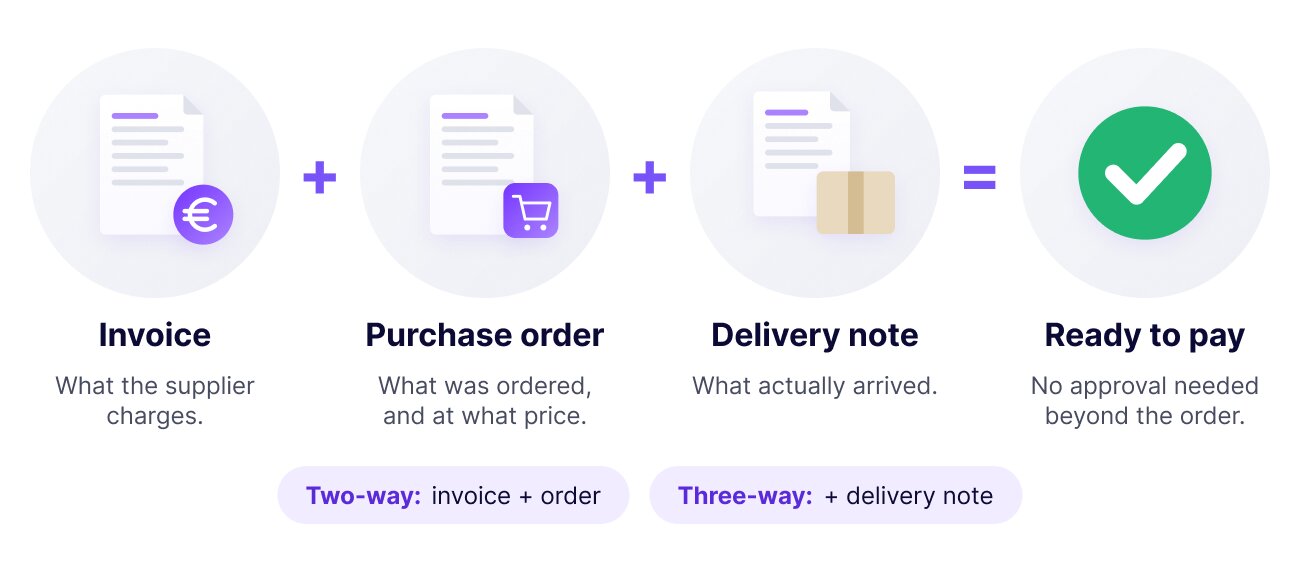
What goes wrong: there is no purchase order to compare against, or it is in another system, and validation comes down to “looks right”. Discrepancies (exceptions) are resolved by email with no record. According to Ardent Partners, on average 14% of invoices end up as exceptions, rising to 22% in the least efficient organisations; it is the main challenge for 53% of departments.
What you need: automatic validation rules (mandatory details, valid tax ID, duplicates by number and supplier, bank account changes), automatic matching with purchase orders where they exist, and an exceptions queue with an owner and a deadline.
Matching each invoice with its purchase order and delivery note is the most effective way to avoid paying for what was neither ordered nor received.
4. Approval
The budget holder confirms that the invoice can be paid. Approval rules depend on the amount, the type of expense and the cost centre: an €80 invoice for office supplies does not need the same route as an €80,000 one for building work.
What goes wrong: the invoice is forwarded by email to the approver, who is travelling, leaves it for later or forwards it to someone else. Nobody knows where it is. Slow approvals are the second most cited challenge in the Ardent Partners study, by 41% of departments.
What you need: an approval workflow with rules by amount and type, delegation for absences, automatic reminders and approval from a mobile phone. And a record of who approved, when and what they saw, because that is the evidence an auditor will ask for.
5. Posting and recording
The approved invoice is recorded in the accounts: expense account, cost centre, input VAT and due date. It is entered in the register book of received invoices. Companies subject to Immediate Supply of Information (SII) must also send their records to the Tax Agency within four days, excluding Saturdays, Sundays and national public holidays.
What goes wrong: the data are keyed in again in the accounting software, with new errors. Or the invoice is posted before it is approved and then has to be cancelled. SII deadlines are missed because the invoice was stuck waiting for approval.
What you need: for the data already extracted and validated to pass into the ERP or accounting software without being keyed in again, with the allocation suggested according to the supplier and the purchase order.
6. Payment and status reporting
Treasury schedules the payment according to the agreed due date, within the maximum periods set by the Late Payment Act. Mandatory electronic invoicing between businesses brings an important change: the recipient will have to report whether they accept or reject each invoice and when they pay it, and payments and rejections will also be reported to the authorities. Royal Decree 238/2026 sets a period of four days, excluding Saturdays, Sundays and national public holidays, for reporting actual payment.
What goes wrong: payment is late because the invoice got stuck earlier, or it is made too early and cash is lost. Nobody records the actual payment date, and under the new obligation that will be a breach, not an oversight.
What you need: a payment forecast based on real due dates, the payment date recorded alongside the invoice and a system able to report statuses (accepted, rejected, paid) automatically.
7. Archiving and retention
The invoice is archived with everything that supports it: purchase order, delivery note, approvals, incidents and proof of payment. It must be kept complete, legible and accessible for the legal period, which in practice is six years. It can be kept in electronic form only, provided the authenticity of its origin, the integrity of its content and its legibility are guaranteed, and the Tax Agency can access it without delay.
What goes wrong: the archive is a shared folder with subfolders by year and made-up file names. The invoice is there, but the purchase order is somewhere else, the approval in an email and the proof of payment at the bank. During an inspection, pulling it all together takes days.
What you need: an archive with the invoice and its related documents linked together, search by supplier, amount and dates, access permissions and a retention policy that says how long things are kept and what happens afterwards. It is, in short, a document management system applied to invoices, with its retention schedules.
Summary: what you need at each stage
The seven stages at a glance, with what is controlled at each one and what it takes to control it.
| Stage | What you control | What you need |
|---|---|---|
| 1. Receipt | That every invoice comes in, with a date | A single point of entry that suppliers know about |
| 2. Capture | Correct data without typing | Automatic AI extraction and review of anything doubtful |
| 3. Validation and matching | Legal requirements, and that what is invoiced was ordered and received | Automatic rules, matching against the purchase order and delivery note, an exceptions queue |
| 4. Approval | That spending is authorised by the right person, on time | A workflow by amount and type, delegations and reminders |
| 5. Accounting | Error-free posting and SII on time | Integration with the ERP or accounting software |
| 6. Payment and status | Paying on time and reporting acceptance and payment | Payment forecasting and automatic status reporting |
| 7. Archiving | Keeping invoices intact for the legal period | An archive with the linked file and a retention policy |
The sales invoice (issued invoices) process: the 6 steps
The sales invoice process is shorter than the purchase invoice process, but cash flow depends on it: an invoice issued late or with errors is money that comes in late. These are its six steps, with what usually goes wrong at each one and what it takes to avoid it.
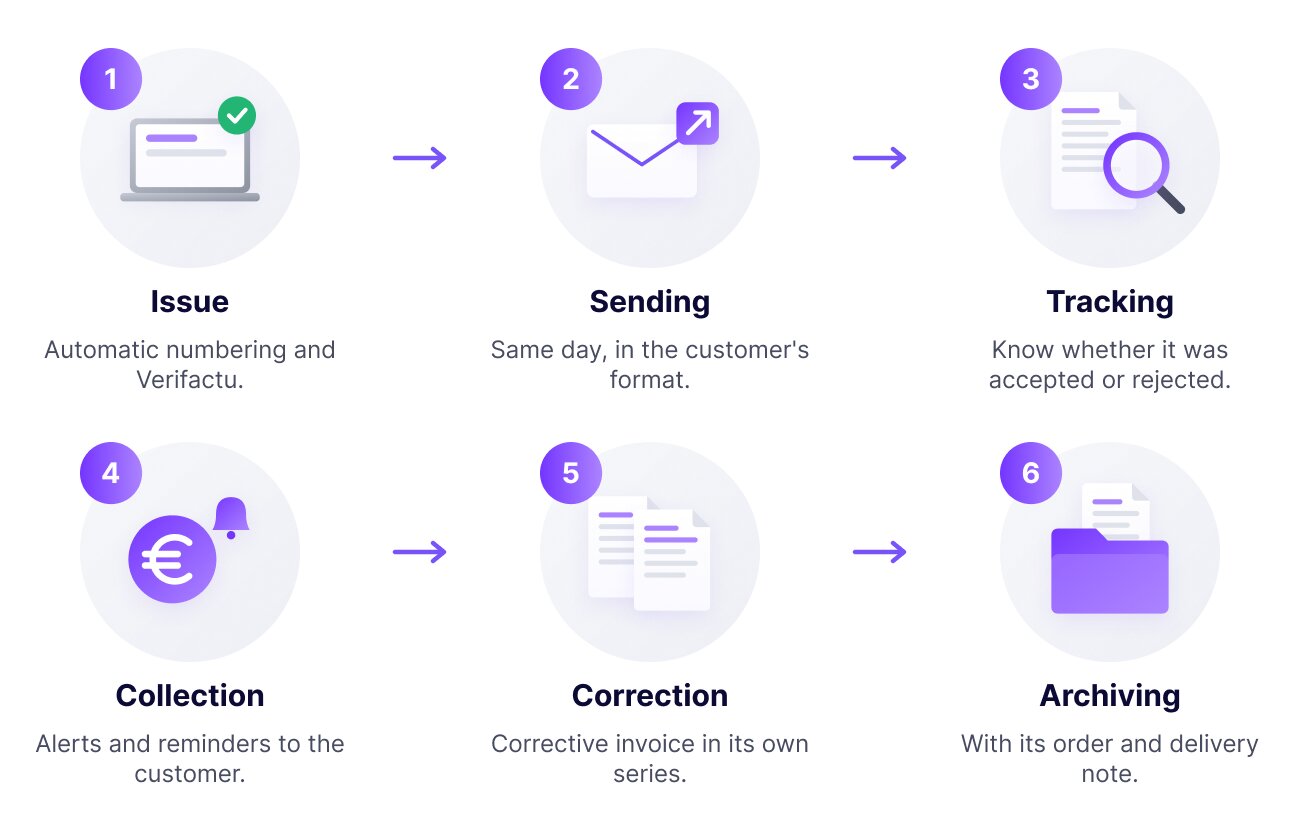
| Step | What goes wrong | What you need |
|---|---|---|
| 1. Issuing | Data already in the order or quote is retyped, mandatory details are missing or a number is skipped | Generate the invoice from the sales data, with automatic numbering and software that complies with Verifactu |
| 2. Sending | It goes out late, to the wrong contact or in a format the customer cannot process | Send it the same day, to the customer’s billing address and in their format: FACe for public administrations and, where mandatory, a structured electronic invoice |
| 3. Tracking | Nobody knows whether the customer has received or accepted it until it falls due | See the status of every invoice. With business-to-business electronic invoicing, the customer will have to report whether they accept or reject it |
| 4. Collection | Due dates are only checked when the account runs short of money | Due-date alerts, automatic reminders to the customer and reconciliation with bank transactions |
| 5. Correction | The original invoice is changed or deleted to fix an error | Issue a corrective invoice, in its own series, that refers to the original |
| 6. Archiving | The invoice stays in the invoicing software and the rest of the sale (order, contract, delivery note) somewhere else | Archive the invoice together with its documents for the legal period, just like purchase invoices |
Two indicators are enough to tell whether it works: the average collection period, that is, how many days on average pass between issuing an invoice and getting paid, compared with the terms agreed with each customer; and the percentage of invoices the customer rejects or sends back for correction. With mandatory electronic invoicing, this second figure will be easy to measure for the first time, because every rejection will be recorded.
What to do when a customer does not pay
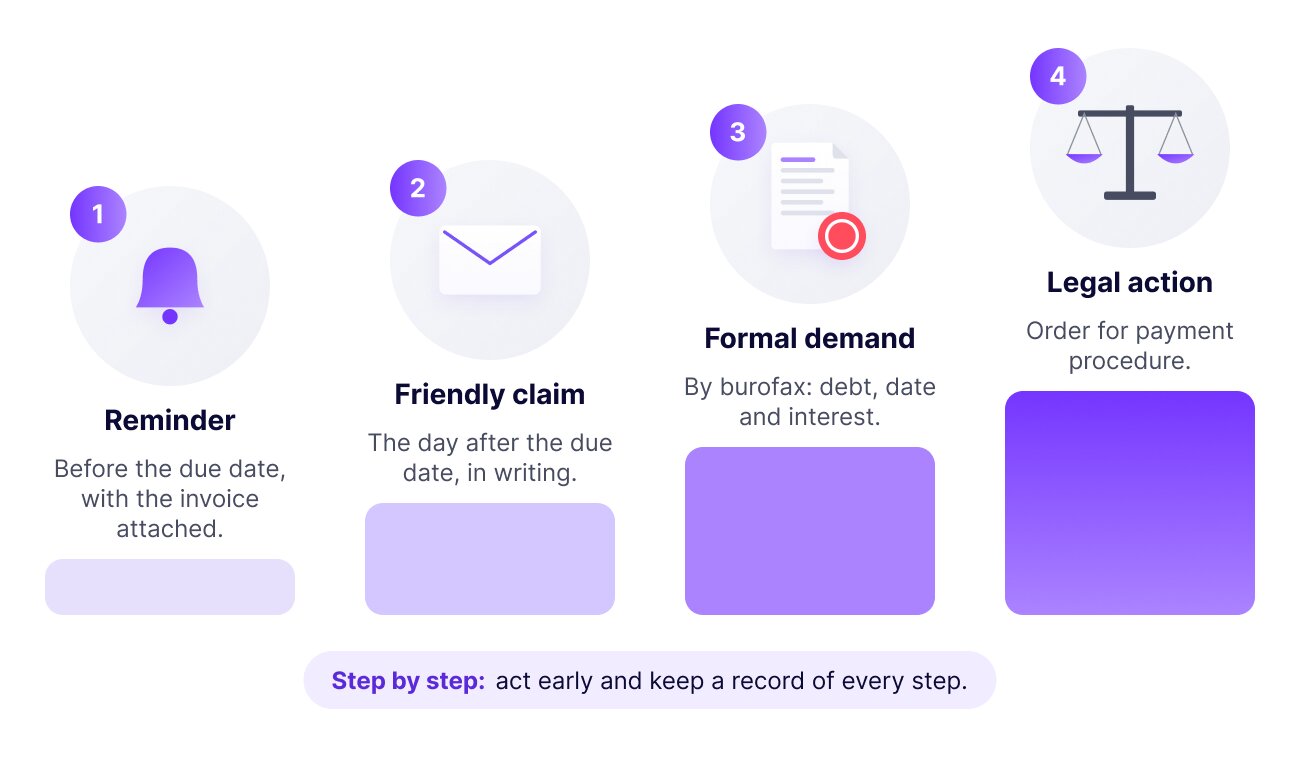
The sooner you act on an unpaid invoice, the easier it is to resolve. This is the usual order, from mildest to strongest:
- A reminder before the due date, not after: a few days before, with the invoice attached and the account number clearly visible.
- A friendly claim the day after the due date, in writing and with a copy of the invoice.
- A formal demand, for example by burofax (certified fax), that records the debt, the date and the late-payment interest that is accruing.
- Legal action. The order for payment procedure (procedimiento monitorio) is designed for overdue, documented monetary debts, such as an unpaid invoice.
The Late Payment Act allows you to claim late-payment interest, which unless otherwise agreed is the European Central Bank rate plus eight points, and 40 euros in collection costs for each invoice. And if the debt is never collected, the VAT Act allows you to recover the VAT already paid by adjusting the taxable base, subject to strict deadlines and requirements that are worth reviewing with your adviser.
The basics every invoice requires: numbering, deadlines, VAT and the invoice register
Before automating anything, there are obligations that every company or self-employed professional must meet with each invoice they issue or receive. They are the ones that raise the most questions for anyone starting out.
Numbering and series
Invoices are numbered consecutively within each series, with no gaps or repeats. Several series can be used, for example one per year or per establishment, and corrective invoices must go in their own series. A gap in the numbering is one of the first things that catches the eye in a tax inspection.
When the invoice must be issued
The invoice is issued at the time of the transaction. If the customer is a business or a professional, the deadline extends to the 16th of the month following the one in which the VAT on the transaction became chargeable. Issuing it later is not just a delay in getting paid: it is a breach of the Invoicing Regulation.
When VAT becomes chargeable
VAT does not become chargeable when the invoice is issued or paid, but when the goods are delivered or the service is provided, with exceptions such as advance payments or the special cash accounting scheme. That is why an invoice issued late does not delay the tax: it must be declared in the period in which the transaction took place.
Invoice register
Companies and professionals subject to VAT must keep a register of issued invoices and another of received invoices, with the details of each one. Those under the SII keep them directly on the Tax Agency’s online portal. A good invoice management system generates these registers on its own, from data that has already been validated, without anyone having to enter them by hand.
Types of invoice worth telling apart
Not all invoices are managed in the same way. These are the ones an invoice management system must be able to handle. Note: an electronic invoice is not a type of invoice but a format; any of these can be electronic.
| Type | What it is | When it is used |
|---|---|---|
| Full or standard | The invoice with all the mandatory details set out in the Invoicing Regulation | In any transaction between businesses and professionals |
| Simplified | The former “ticket”, with fewer mandatory details | Amounts of up to €400 including VAT, or up to €3,000 in certain sectors such as hospitality or retail |
| Corrective | Corrects or cancels another invoice, which it references | Errors, returns, subsequent discounts or non-payment |
| Summary | Groups several transactions with the same customer over a period | Recurring supplies or services, at most within the same calendar month |
| Pro forma | A quote in the form of an invoice. It is not an invoice and has no tax effect | Before the transaction, to inform the customer or process an advance payment |
| Intra-community and export | Transactions with customers in other EU countries or outside the EU | With specific statements on the exemption or reverse charge |
What Spanish regulations require of invoice management in 2026
Invoice management in Spain is changing more in these few years than in the previous two decades. These are the rules that affect it and where they stand as of November 2026:
Mandatory electronic invoicing between businesses
Ley 18/2022, known as the Crea y Crece Act, requires all companies and professionals to issue, send and receive electronic invoices in their transactions with other companies and professionals. Royal Decree 238/2026 set out the implementing regulation: the invoice must be structured (based on the European EN16931 model, in UBL, CII, EDIFACT or Facturae syntax; a PDF is not enough), it can be exchanged through the Tax Agency’s public electronic invoicing solution, which is free and uses UBL, or through private platforms, and the recipient must tell the issuer whether they accept or reject it and when they pay it. Only a rejection or full payment has to be reported to the authorities: an invoice that is not rejected is presumed accepted. Structured means it is a file, usually XML, in which every piece of data has its own tag and which software can process without human intervention; a PDF or a photo, on the other hand, can only be read properly by a person. Invoices from foreign suppliers will keep arriving in other formats, so the system will have to accept both kinds through the same channel.
What changes in practice, who it affects and how to prepare are explained in the guide to B2B electronic invoicing.
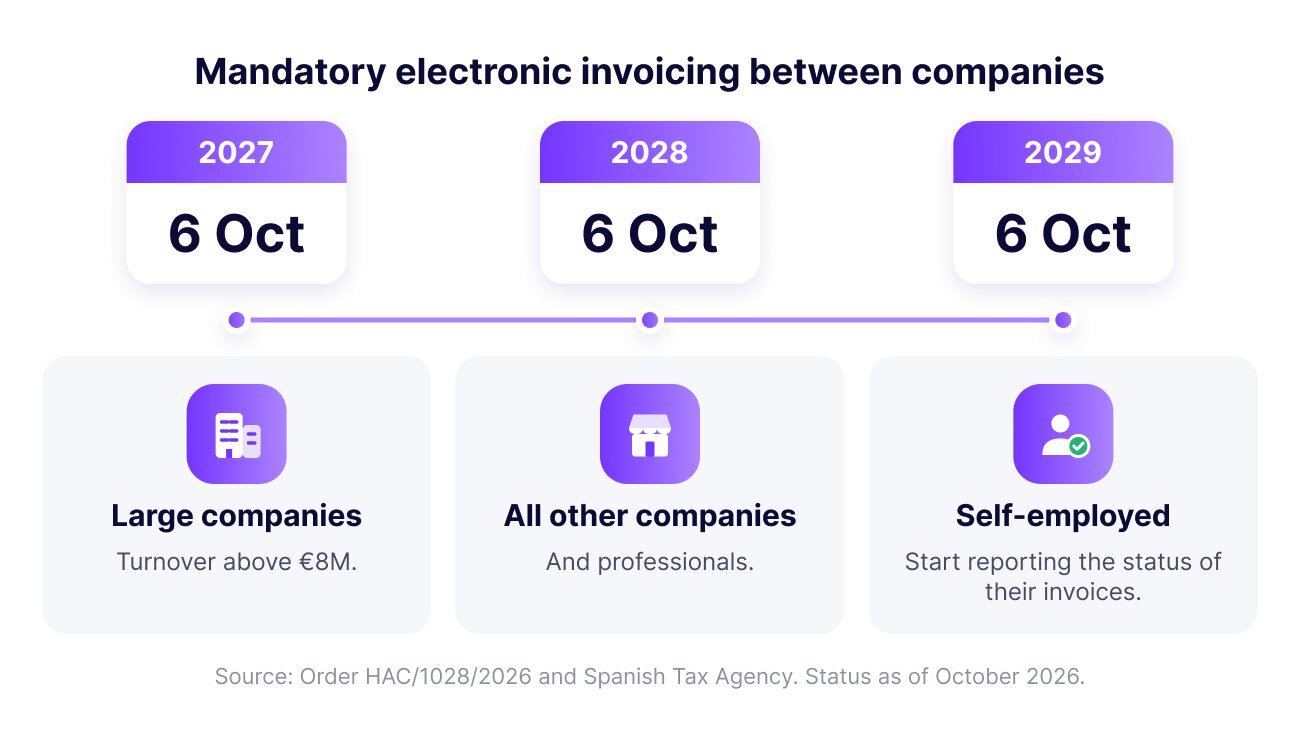
Order HAC/1028/2026, published in the BOE on 5 October 2026, set the timetable in motion. According to the Tax Agency:
- 6 October 2027: companies and professionals with a turnover of more than 8 million euros.
- 6 October 2028: all other companies and professionals.
- 6 October 2029: individuals (the self-employed) and income attribution entities start reporting invoice statuses.
Verifactu: requirements for invoicing software
Royal Decree 1007/2023 sets out the requirements that invoicing software must meet: it must guarantee the integrity, retention, accessibility, legibility, traceability and unalterability of records, so that invoices cannot be deleted or changed without leaving a trace. In Verifactu mode, each record is sent to the Tax Agency at the moment it is issued.
The original dates were 1 January 2027 for corporate income tax payers and 1 July 2027 for everyone else. Royal Decree-law 43/2026, published in the BOE on 25 November 2026, postponed them to coincide with mandatory electronic invoicing: software must be adapted 24 months after Order HAC/1028/2026 came into force, that is, by 6 October 2028, the same date for all companies. Like every royal decree-law, it has to be ratified by Congress. For those who issue few invoices and have no software of their own, the Tax Agency offers a free application that already complies with Verifactu.
How to check that your software complies and what the manufacturer’s Declaración Responsable (statement of compliance) must include is covered in what Verifactu requires and how to check it.
Verifactu and electronic invoicing are not the same thing: one regulates the software you issue invoices with; the other, the format and delivery of each invoice.
SII and TicketBAI
The SII (Immediate Supply of Information) requires companies with a turnover of more than 6 million euros, VAT groups and those registered for monthly VAT refunds to send their invoice records to the Tax Agency within four days. In the Basque Country, the provincial councils of Álava, Gipuzkoa and Bizkaia apply their own system, TicketBAI, with obligations for invoicing software equivalent to Verifactu.
Invoices to public administrations: FACe
Since January 2015, Ley 25/2013 has required electronic invoicing to public administrations, through FACe or the regional entry points, and each invoice must carry the DIR3 codes of the managing body, the processing unit and the accounting office it is addressed to. It is the forerunner of what is now coming between businesses: according to the official FACe report, more than 158 million invoices had been submitted through this channel by July 2026.
Payment terms: the Late Payment Act
Ley 3/2004 (the Late Payment Act) sets the payment term between businesses at 30 calendar days from receipt of the goods or provision of the service. The parties can agree a longer term, but never more than 60 days. If there is an acceptance or inspection procedure, it cannot last more than 30 days. Public administrations, under the Public Sector Contracts Act, must pay within 30 days. A slow approval process is no valid excuse: the clock keeps running regardless.
How long invoices must be kept
There are two periods and the longer one applies. Tax law requires invoices to be kept for as long as the tax authorities can review the taxes they relate to, which become time-barred four years after the end of the filing period. Article 30 of the Commercial Code requires commercial records to be kept for six years from the last accounting entry. In practice, that means six years at least, and longer if the invoice supports a depreciation, a tax loss carryforward or a legal dispute.
All these obligations, with their deadlines and status, in one table:
| Obligation | Rule | Who it affects | Deadline or date | Status (Nov. 2026) |
|---|---|---|---|---|
| Electronic invoicing between businesses | Ley 18/2022, RD 238/2026 and Order HAC/1028/2026 | Companies and professionals in Spain | 6-10-2027 (over €8M) and 6-10-2028 (all others) | Timetable in force |
| Reporting acceptance, rejection and payment | RD 238/2026 | Invoice recipient | Payment: 4 days, excluding Saturdays, Sundays and public holidays | Same timetable; self-employed from 6-10-2029 |
| Compliant invoicing software (Verifactu) | RD 1007/2023 | Anyone who issues invoices with software | 6-10-2028 (everyone) | Postponed by Royal Decree-law 43/2026 (BOE of 25-11-2026) |
| SII | RD 596/2016 | Over €6M, VAT groups and monthly refunds | 4 days, excluding Saturdays, Sundays and public holidays | In force since 2017 |
| TicketBAI | Provincial regulations | Álava, Gipuzkoa and Bizkaia | Depends on each territory | In force |
| Invoicing public administrations (FACe) | Ley 25/2013 | Public sector suppliers | Since 15-1-2015 | In force |
| Payment term | Ley 3/2004 | Transactions between businesses | 30 days, extendable by agreement up to 60 | In force |
| Retention | General Tax Act and art. 30 of the Commercial Code | All companies | 4 years (tax) and 6 years (commercial) | In force |
How to measure invoice management: 8 KPIs
Few companies know how much it costs them to process an invoice or how long it takes. These eight indicators are enough to find out, for both purchase and sales invoices, and all of them can be calculated if invoices go through a single system that records dates and statuses. The benchmarks for purchase invoices come from Ardent Partners’ 2025 study; the payment ones, from the Late Payment Act.
| KPI | What it measures | Benchmark |
|---|---|---|
| Cost per invoice | Total cost of the accounts payable process divided by the number of invoices processed | $9.40 (about €8.70) on average; $2.78 (about €2.60) for the most efficient |
| Processing time | Days from receipt until the invoice is approved and ready to pay | 9.2 days on average; 3.1 for the most efficient |
| Exception rate | Invoices that fail validation or matching and need someone to step in | 14% on average; 9% for the most efficient |
| Touchless invoices | Invoices that go through the whole process without anyone touching them | 32.6% on average; 49.2% for the most efficient |
| Average supplier payment period | Average days between receiving an invoice and paying it | Legal maximum: 30 days, or 60 if agreed |
| Average collection period | Average days between issuing a sales invoice and getting paid | Compare with the terms agreed with each customer |
| Rejected sales invoices | Percentage of issued invoices that the customer rejects or sends back for correction | The closer to zero, the better: every rejection delays payment |
| Duplicate or incorrect payments | Invoices paid twice or without justification | Target: zero |
Example: what it means for a company with 500 invoices a month
To get a sense of the scale, take a company that receives 500 supplier invoices a month, 6,000 a year, and apply the costs from the Ardent Partners study. The study is international and mostly North American, so the original figures are in dollars; the approximate equivalent in euros is shown in brackets. Costs in Spain are different, but what matters is the ratio between one process and another.
- With an inefficient process ($12.88 per invoice), it costs about $77,300 a year (about €71,400).
- With an average process ($9.40), about $56,400 a year (about €52,100) and 9.2 days.
- With an efficient process ($2.78), about $16,700 a year (about €15,400) and 3.1 days.
The difference between the worst and the best scenario is more than $60,000 a year (about €56,000), without counting duplicate payments avoided, early payment discounts taken or the time the team no longer spends answering suppliers. With other costs the figure changes, but the conclusion does not: the same volume of invoices costs several times more with a manual process, which is why invoice management is one of the first processes companies automate.
The minimum that has to work in invoice management
Whatever the size of the company, five habits prevent almost every problem:
- One place for all invoices, issued and received, in digital form and organised by date, customer or supplier. No more invoices scattered across email, mobile phones and a desktop folder.
- Record every invoice received on the day it arrives, with its due date. An expense that is not recorded is VAT that is not deducted.
- Review outstanding payments every week and chase an invoice as soon as it falls due, not the following month.
- Share invoices with your adviser or accounting team as they are generated, not in an email with eighty attachments the day before the quarter closes.
- Use invoicing software that complies with Verifactu and lets you issue and receive electronic invoices, which will be mandatory for all companies and self-employed professionals by 6 October 2028 at the latest.
The retention rules are the same for all companies: at least six years. And invoices can be kept in digital form only, as long as their integrity, legibility and accessibility for the Tax Agency are guaranteed.
5 invoice management best practices
- A single way in. Give all your suppliers one channel for sending invoices, and make sure none enters the process any other way. It is the cheapest measure and the one that prevents the most issues.
- No purchase order, no payment. Require a purchase order number for recurring and significant purchases: it is what makes automatic matching possible and what cuts exceptions the most. For expenses without a purchase order, such as utilities, decide who approves them by default.
- Approvals by risk, not by org chart. An invoice that matches its purchase order and delivery note needs no approval beyond that of the order. Keep manual approvals for exceptions and large amounts: every extra approver is an extra day.
- Control bank details. Do not accept a change of bank account from a supplier by email without checking it through another channel, and have the system warn you when an invoice shows an IBAN different from the one on record. This is how most fraud gets in.
- Measure and review every quarter. Track the KPIs in this guide and ask yourself which suppliers generate the most exceptions, which approvals get stuck, which customers pay late and which invoices still arrive on paper. Most improvements come from there, not from switching tools.
When to stop managing invoices with Excel and email
With just a few invoices a month, a spreadsheet, a well-organised folder and email work fine. The problem starts when several people handle the invoices, when you have to prove who approved what, or when the volume exceeds what one person can keep in their head. Four signs that you have reached that point:
- You have paid an invoice twice, or found out that one was still outstanding when the supplier chased it.
- Closing the quarter with your adviser takes days of searching for invoices in your inbox.
- You do not know where an invoice stands: whether it has been approved, posted or paid.
- Your current software is not ready for Verifactu or for issuing and receiving structured electronic invoices.
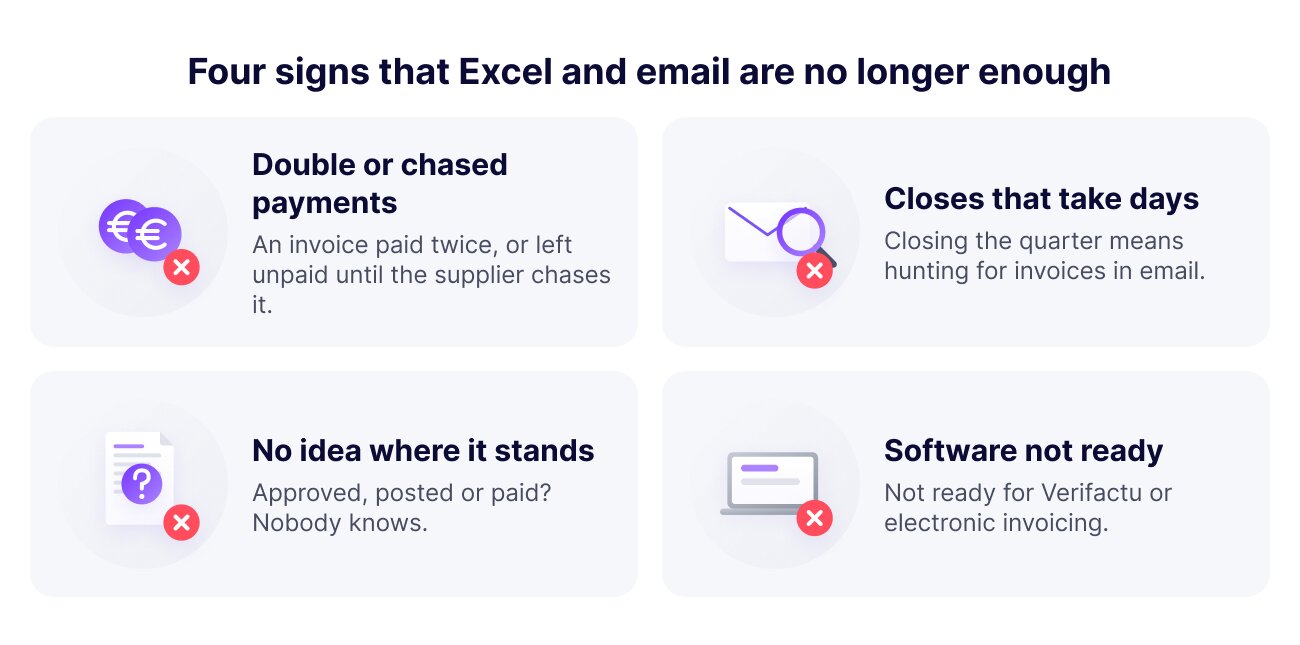
The last sign will reach every company. With mandatory electronic invoicing, every invoice will be a structured file that has to be received, validated and responded to on time, and that cannot be done with a spreadsheet.
How to automate invoice management
Automating is not scanning invoices. It means getting most invoices through the seven stages without anyone having to touch them, so that people only deal with the exceptions. According to Ardent Partners, the most efficient organisations already process almost half of their invoices with no manual intervention (49.2%), compared with an average of 32.6%.
Automating is not scanning: it means getting most invoices through the process without anyone touching them, so that people only handle the exceptions.
OCR and artificial intelligence: what each one does
- Digitisation: turning paper into an image. Necessary, but on its own it does not extract any data.
- OCR: recognises the characters in the image. To know what each piece of data is, it needs a template for each supplier, and it fails when the supplier changes the layout of its invoice.
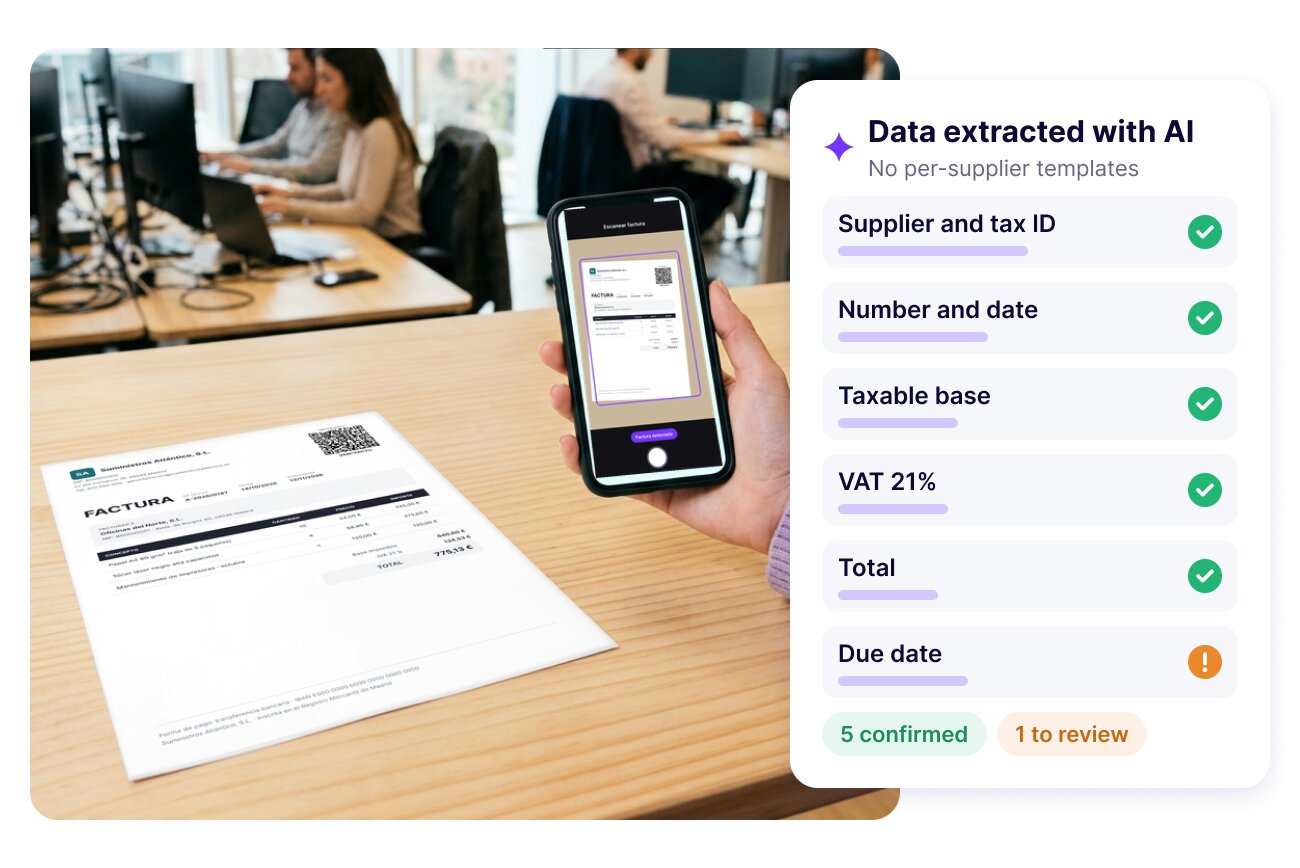
- Artificial intelligence: understands the invoice the way a person would, identifies each piece of data from its context and works with new suppliers without setting them up. It can also classify the expense, suggest the ledger account and detect anomalies, such as an amount very different from what that supplier usually charges.
Its use is already widespread: according to the survey by the Spanish National Statistics Institute (INE) published in October 2026, 33.6% of Spanish companies with 10 or more employees were using artificial intelligence in the first quarter of 2026. That said, artificial intelligence does not replace validation: it speeds it up. A good implementation sets a confidence threshold below which a person reviews the data, and records who confirmed it.
What an invoice management system should have
- Receipt through a single channel, for PDF, paper and structured-format invoices (Facturae, UBL).
- Automatic data extraction with AI, with only doubtful data sent for review.
- Validation of legal requirements, and detection of duplicates and IBAN changes.
- Matching with purchase orders and delivery notes.
- Configurable approval workflow, with delegation, reminders and approval from a mobile phone.
- Integration with the ERP or accounting software, with no retyping.
- Invoice issuing in line with Verifactu and status reporting to the public electronic invoicing solution.
- An archive holding each invoice and its file, with access permissions, an activity log and a retention policy.
- Reports on the process KPIs.
How to implement an invoice management system in 6 steps
Implementing the system does not start with choosing the software: it starts with knowing how invoices come in today and where they get stuck. This is the order that works, with the typical mistake at each step.
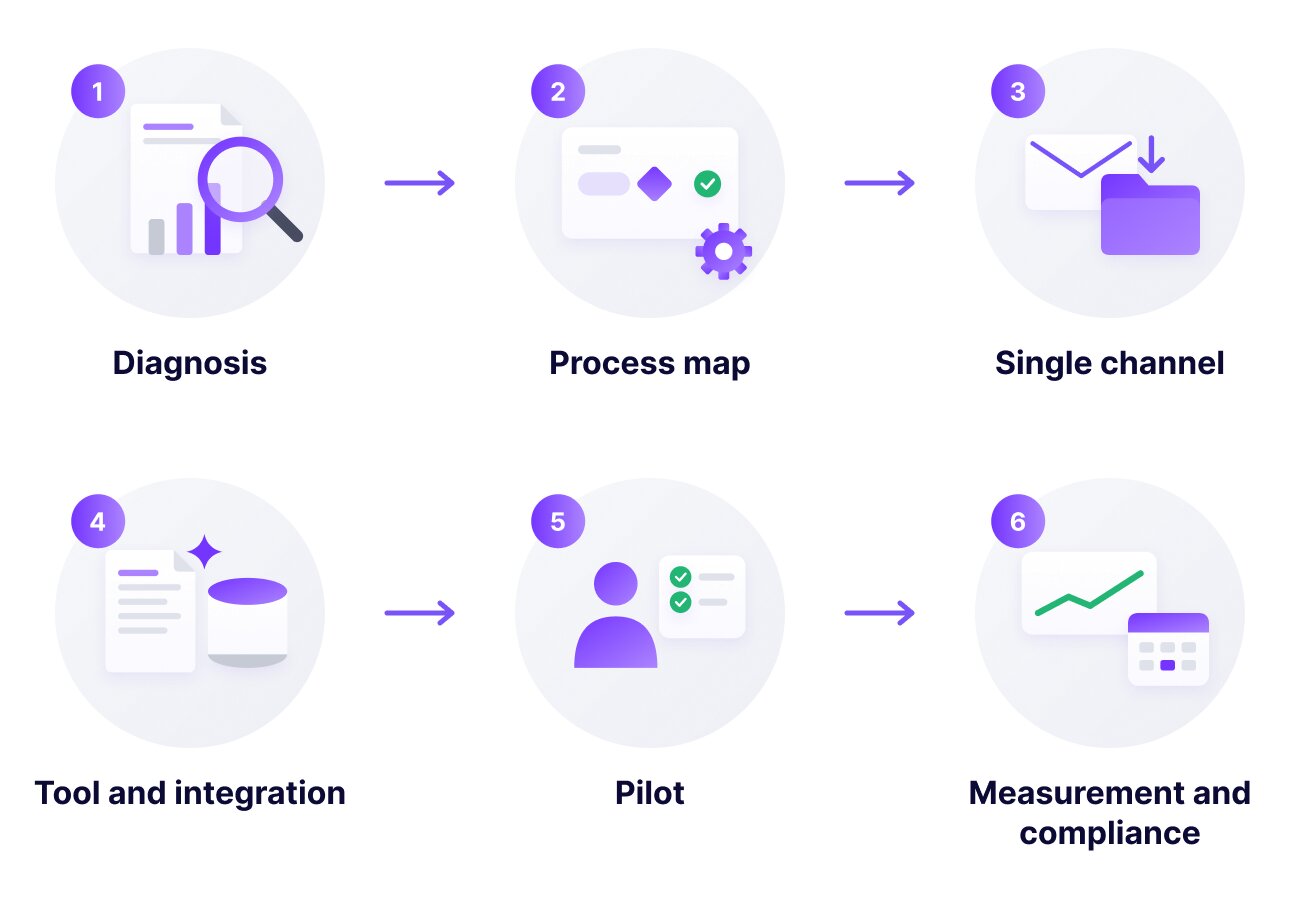
- Assessment. Count how many invoices you receive and issue each month, through which channels they arrive, in what format and how long they take to be paid on average. Typical mistake: skipping this step and then being unable to show what has improved.
- Process map and rules. Map out the seven stages as they are today and decide how you want them to be: who approves what, with which thresholds, what is matched against a purchase order and what is not. Typical mistake: automating the current process with all its bad habits.
- Single channel and suppliers. Open the single point of entry and tell suppliers about it, starting with those who send the most invoices. Typical mistake: opening the channel without telling anyone and still receiving invoices from everywhere.
- Tool and integration. Set up extraction, validations and the approval workflow, and connect it to your accounting system or ERP. Typical mistake: leaving integration until the end and carrying on typing into the accounting software.
- Pilot. Start with one type of invoice or one department for one or two months: recurring suppliers with purchase orders are usually the best starting point. Measure, adjust the rules and expand. Typical mistake: launching everything on the same day.
- Measurement and regulations. Track the 8 KPIs from day one and check the electronic invoicing and Verifactu timetable so the system is ready before each deadline. Typical mistake: considering the project finished once it goes live.
A well-implemented system shows within a quarter: no lost invoices, no duplicate payments, approvals in days rather than weeks, and any invoice with its complete file in seconds.
How R2 Docuo applies this process
R2 Docuo’s invoice manager covers both sides of the process. For incoming invoices, you just upload the PDF or take a photo and its artificial intelligence extracts the data and classifies the invoice. For outgoing invoices, it generates invoices that comply with Verifactu and Facturae, tracks their payment status with automatic alerts and is ready to connect to the public electronic invoicing solution, once it goes live, to report invoices and payment statuses without manual uploads. It exports journal entries to your ERP or accounting software and lets you give your adviser direct access.
Like the rest of R2 Docuo, it is certified under the Spanish National Security Framework (ENS) and ISO 27001, and it hosts data in Spain. R2 Docuo’s customers include Grupo IFA, FNAC, RACE, TÜV SÜD and Elecnor. Its users rate it 4.5 out of 5 on G2, from 100 verified reviews.
Frequently asked questions about invoice management
Invoice management is the set of tasks a company uses to control the invoices it receives and issues throughout their whole life cycle: receipt, data extraction, validation, approval, accounting, payment or collection, reporting their status to the Tax Agency and archiving for the legal retention period. Its aim is to pay and collect the right amounts, on time and with evidence of every step.
For incoming invoices there are seven: receipt, capture and data extraction, validation and matching against the purchase order and delivery note, approval, accounting and recording, payment and status reporting, and archiving and retention. For outgoing invoices, the process is issuing, sending, tracking, collection, correction if needed and archiving.
Invoicing is issuing invoices to customers: creating, numbering and sending them. Invoice management is the whole process, which includes invoicing but also the invoices received from suppliers, and checking, approving, paying, collecting and archiving them.
Under the Invoicing Regulation (Royal Decree 1619/2012), a full invoice must include a number and, where applicable, a series; the date of issue; the name or company name, tax ID (NIF) and address of both the issuer and the recipient; a description of the transactions; the taxable base, VAT rate and VAT amount; and the transaction date if it differs from the date of issue.
At least six years. Tax law requires them to be kept for the tax limitation period, four years from the end of the filing deadline, and Article 30 of the Commercial Code requires business records to be kept for six years from the last entry. The longer period applies.
Yes, as long as the authenticity of their origin, the integrity of their content and their legibility are guaranteed for the whole retention period, and the Tax Agency can access them without delay. Paper invoices can be digitised and destroyed if the digitisation is done with software approved by the Spanish Tax Agency (Agencia Tributaria).
Ley 3/2004 (the Late Payment Act) sets 30 calendar days from receipt of the goods or service unless otherwise agreed, and a maximum of 60 days if agreed. If there is an acceptance procedure, it cannot last more than 30 days. Paying late entitles the supplier to claim late-payment interest and 40 euros in collection costs.
It is checking that a supplier invoice matches the purchase order and the delivery note or goods receipt: that what is invoiced is what was ordered, at the agreed price, and that it has actually arrived. It is the most effective way to prevent incorrect payments and the basis for approving invoices automatically.
With a single receiving channel, automatic data extraction with artificial intelligence, validation rules and matching against purchase orders, a configurable approval workflow, integration with the ERP or accounting system, and a digital archive with legally compliant retention. The aim is for most invoices to be processed without manual intervention, so people only deal with the exceptions.
According to Ardent Partners’ AP Metrics that Matter in 2025 study, the average cost of processing a supplier invoice is 9.40 dollars (about 8.70 euros), compared with 2.78 dollars (about 2.60 euros) in the most efficient organisations and 12.88 dollars (about 11.90 euros) in the least efficient. The difference depends mainly on the level of automation and the percentage of exceptions.
The main ones are the full or standard invoice; the simplified invoice, for amounts of up to 400 euros including VAT, or 3,000 in some sectors; the corrective invoice, which corrects or cancels another one; the summary invoice, which groups transactions from the same month; and intra-EU and export invoices. A pro forma is not an invoice, and an electronic invoice is not a type but a format.
Three changes are under way: structured electronic invoicing will be mandatory between businesses from 6 October 2027 for companies with a turnover above 8 million euros and from 6 October 2028 for everyone else; the recipient will have to report whether it accepts, rejects and pays each invoice; and invoicing software will have to comply with Verifactu from 6 October 2028.