


Types of Electronic Signature: Characteristics and Comparison Table

At present there are only two types of electronic signature recognised by the European Union in its eIDAS regulation. They are not, however, the only way of signing documents with the help of digital tools while keeping the process legally valid.
In this article we are going to look at the types of electronic signature that exist, their particularities in terms of security and evidentiary weight, and the experience they offer the signatory.
Although the advantages of the electronic signature are many, it is important to be clear about the technical, regulatory and legal requirements an electronic signature must meet depending on the country the company operates in. In this article we will focus on the types of electronic signature valid in Spain and Europe.
Are electronic signature and digital signature the same thing?
Before getting into the types, it is worth clearing up a very common confusion: electronic signature and digital signature are not synonyms.
A digital signature uses technology based on cryptography, which means the document and everything it contains is protected at the moment of signing and admits no later changes. That provides security and authenticity, because only the owner of the key can sign.
An electronic signature, on the other hand, is an umbrella term covering different types of signature: it includes the digital signature, but also scanned handwritten signatures, biometric signatures and others.
A digital signature is always an electronic signature, but an electronic signature is not always a digital signature.
Types of Electronic Signature legally regulated in Europe
Regulation (EU) No 910/2014, more commonly known as eIDAS, establishes only two valid ways of signing a document remotely by electronic means across the whole European Union:
Advanced Electronic Signature
In this signature type there is a figure known as the Trusted Third Party, which acts as an intermediary between the entity issuing the document and the rest of the signatories. Typically this role is played by the Electronic Signature Software provider, which controls the process and stores all the information collected during it.
| What it involves | The signatory receives a signing link by email, reviews the document, and then signs it by drawing a stroke on their device or by receiving a security code via SMS. |
| Document integrity | The document is protected against changes during the signing process and after it. If anyone tries to modify it, the signature is invalidated. |
| Signatory’s identity | The signatory’s identity is checked during the process, but it is not guaranteed. |
| Authenticity of the signature | Reasonable measures are taken to verify that only the signatory could have signed. |
| In case of repudiation | If the signatory claims that the signature is not theirs, the company that issued the document has to prove that the signature is genuine, using the evidence provided by the trusted third party. |
The advanced electronic signature, with its limitations, is 100% valid from a legal point of view and has the following advantages:
- Ease of use. It is without doubt the simplest experience for the signatory.
- Speed. The signing process can be completed in minutes.
On the other hand, in the event of repudiation, the entity issuing the document has the legal task of proving the authenticity of the signature with the help of the Trusted Third Party.
“For an Advanced Electronic Signature to be valid, the chosen Software must be registered with the Spanish Ministry of Economic Affairs and Digital Transformation”
It is important to point out that, in the case of Spain, for the Advanced Electronic Signature to be valid, the chosen trusted third party (that is, the software or service used) must be registered with the Ministry of Economic Affairs and Digital Transformation as a “Non-Qualified Electronic Trust Service Provider“.
You can consult the list of registered providers on the Ministry’s website.
Qualified Electronic Signature
This signature type is the most secure, because it is based on the use of a Digital Certificate issued by a Trust Service Provider.
Digital Certificates are an electronic file (typically with a .pfx extension) containing information about the identity of a person or entity. If these certificates are issued by a qualified authority (for example the Fábrica Nacional de Moneda y Timbre in Spain), they carry as much evidentiary weight as a national ID card or a passport.
To be used, digital certificates require not only the file issued by the authority, but also that it be installed on a device and that the password be known.
| What it involves | The signatory opens the document to be signed (PDF) in Electronic Signature Software from a device with their digital certificate installed. On signing it, part of the certificate’s information is permanently embedded in the document. |
| Document integrity | The document is protected against changes during the signing process and after it. If anyone tries to modify it, the signature is invalidated. |
| Signatory’s identity | The signatory’s identity is guaranteed. |
| Authenticity of the signature | Strict measures are taken to verify that only the signatory could have signed. |
| In case of repudiation | If the signatory claims that the signature is not theirs, it is the signatory who has to prove that the signature is false, by whatever means they see fit. |
The qualified electronic signature is equivalent to a handwritten signature given in person and offers the highest guarantees. Its advantages are:
- Security. It is 100% equivalent to an accredited handwritten signature given in person.
In exchange, the technical requirements of digital certificates mean the signing experience is not as smooth, and in almost every case the digital certificate has to be installed on the signatory’s device beforehand.
For the Qualified Electronic Signature to be valid, attention must be paid to the entity that issued the digital certificate the signatory uses, since it might not have sufficient authority.
It is important to point out that, in the case of Spain, to guarantee the authenticity of the Qualified Electronic Signature, the digital certificate used (not the software) must be issued by an entity registered with the Ministry of Economic Affairs and Digital Transformation as a “Qualified Electronic Trust Service Provider“.
You can also consult the list of registered providers on the Ministry’s website.
Other types of signature
Although the two above are the only ones covered by the eIDAS regulation, the reality is that there are digital aids to the handwritten signature which are widely used today and do not always offer the necessary guarantees.
Handwritten signature assisted by digital means
This is the process by which tools such as email are used to send a digital document that is printed, signed and then sent back and forth between the parties. The typical process is:
| What it involves | One party emails the other the document in Word 365, PDF or similar. The other party completes the document, prints it, signs it with a pen, scans it and emails back a copy of the scanned document. |
| Document integrity | Not guaranteed. |
| Signatory’s identity | Not guaranteed. |
| Authenticity of the signature | Not guaranteed. |
| In case of repudiation | The affected party will have to resort to evidence such as expert analysis of the emails or handwriting studies to try to prove the authenticity or falsity of the signature, or of the signed document. |
This process may or may not be followed by sending the originals by ordinary post or courier, and by their physical filing.
Print, sign in pen, scan and email back: the most widely used signing procedure is the one that offers the parties the fewest guarantees.
Even though it is the most widely used, this type of signature paradoxically offers the least security, and it must not be confused with the validity of a handwritten signature given in person or before a notary.
Without solving them entirely, there are Electronic Signature Solutions that address some of the shortcomings of this type of signature, through the use of forms and version control processes on the PDF files being sent.
Why the handwritten signature works out expensive
Beyond the legal guarantees, this procedure has an operational cost that is rarely calculated. At a minimum it means printing the document, signing it, scanning it, sending the scan ahead, posting the originals and filing them. And that is assuming only one party signs: if two signatures are needed, the counterparty has to repeat the whole process in the opposite direction.
A study by Forrester Consulting quantified the impact: companies that do not use electronic signature spend, on average, 20 more days on each transaction.
On top of that there are two less visible problems:
- Traceability. Documents end up scattered across physical and shared folders, hard to locate and with no way of knowing what state they are in: reviewed, pending, signed.
- Integrity. Nothing stops someone from making a note in pen on a document that has already been signed, and nobody could prove whether it was there at the moment of signing.

Alternatives to the electronic signature
Many of the day-to-day operations companies carry out do not need a legal binding as strict as an electronic signature.
When a procedure is reviewed, when it is confirmed that a package has been delivered, or when the go-ahead is given to pay an invoice, any workflow management software can provide a form of validation that is not necessarily a signature. This is called Electronic Validation.
The digital trail left when someone presses an “I accept” button or ticks a checkbox is called “Electronic Validation”, and in many cases it can be enough to prove that a person performed an action.
We are talking about the “digital fingerprint” left by these processes when “I accept” boxes are ticked, buttons are pressed or digital actions are taken and recorded in the software.
Although it is more cumbersome than having an electronic signature, in the event of a problem this digital fingerprint can be submitted as evidence in legal proceedings under the supervision of an expert, and accepted as proof that a specific action was performed by a given person.
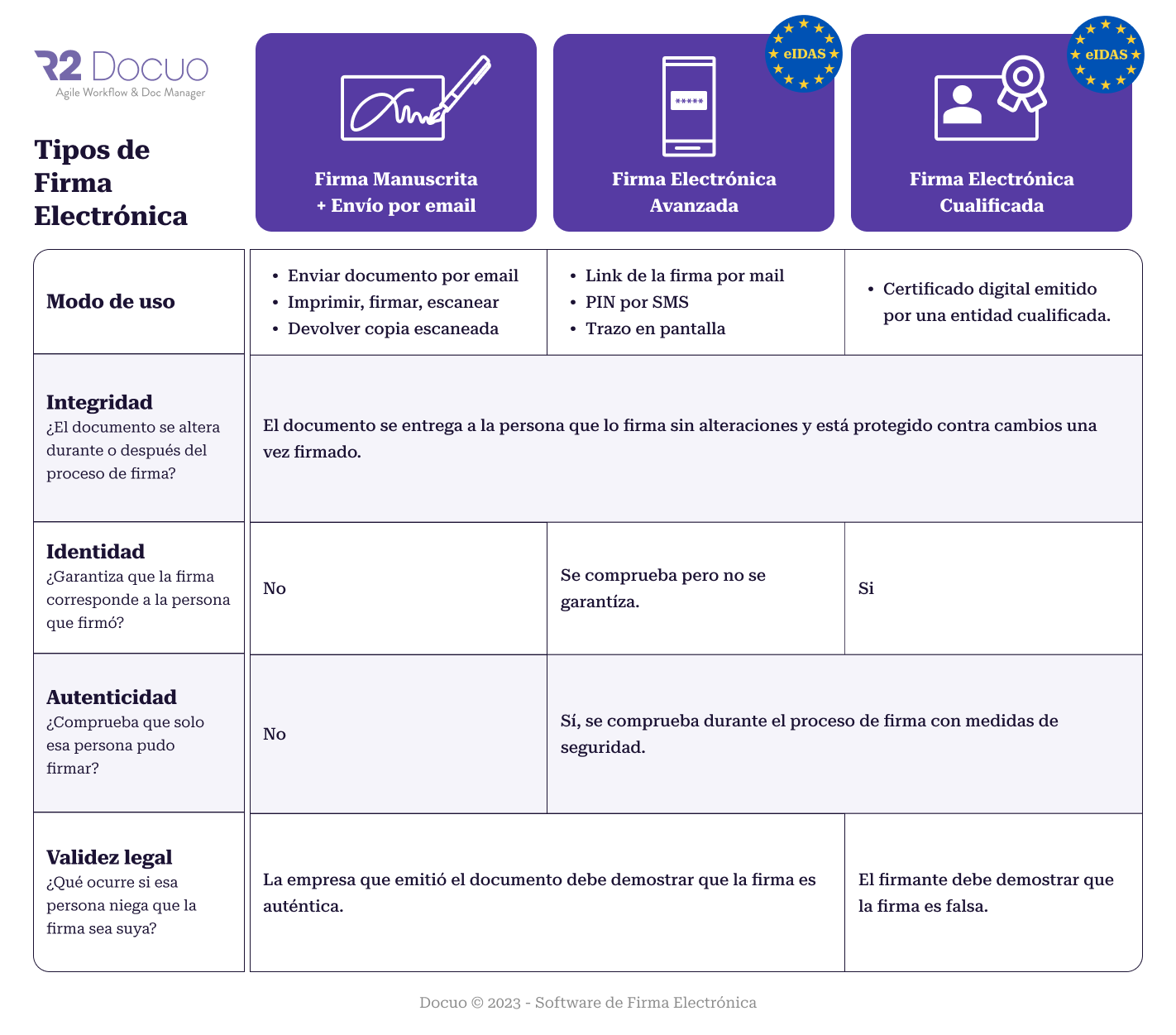
Comparison table
Click on the image to enlarge it:
Types of Electronic Signature Software on the market
Once you have chosen the type of signature you need, what remains is deciding which tool to use. Although there are many products, they fall into two broad families:
- Tools focused on the signing process. They cover signing and nothing else: they start from a PDF or a template, accept a list of recipients and manage the circuit through to the signed document.
- Tools built into Document Management Systems or Content Services Platforms. On top of signing, they cover the entire lifecycle of the document: automatic creation, review, storage and subsequent management.
Advantages and drawbacks of each type
The former usually offer a great many options for each signing process, but they may need to be integrated with other corporate software so as not to break the automation of the complete process.
Document management systems and content platforms (ECM, CSP) have the advantage of including signing as one more step in the business process. Software that manages contracts and quotes can build signing into the flow itself: you do not need to buy two products, just one. In exchange, the signing options may be less varied, or defined in general terms rather than case by case.
If signing is one step in a broader process (drafting, reviewing, signing, filing), the second family saves you integrating two tools.
Digital Signature in Docuo
Docuo is an Electronic Signature platform registered with the Spanish Ministry of Economic Affairs and Digital Transformation, offering every type covered by the eIDAS regulation and described in this article:
- With eSignature it offers the Advanced Electronic Signature
- With eCertificate it offers the Qualified Electronic Signature
- With eBasic it offers the Handwritten Signature assisted by digital means
- With Workflow Management, it offers Electronic Validation at every step of the process
If you want to find out how Docuo can help your organisation with its signing processes, contact us and request a demo.